

Ai Evals Hw3 Phoenix Solution

Homework 3: LLM-as-Judge - Phoenix Walkthrough
This notebook walks through the reference implementation for Homework 3, and discusses additional topics. This notebook was reviewed in Priyan's HW review video.
Launch Phoenix
First, let's set up Phoenix on our local machine. You should run these commands within your terminal in your chosen environment.
(If you have already done this in a previous HW assignment, you are good to go.)
Install Phoenix
pip install arize-phoenix
Boot up Phoenix on localhost
phoenix serve
Set OpenAI API Key for LiteLLM calls
export OPENAI_API_KEY="your openai api key"
Reference Implementation Structure
homeworks/hw3/
├── scripts/
│   ├── generate_traces.py          # Generate Recipe Bot traces with parallel processing
│   ├── label_data.py               # Use GPT-4o to label ground truth (150 examples)
│   ├── split_data.py               # Split data into train/dev/test sets
│   ├── develop_judge.py            # Develop LLM judge with few-shot examples
│   ├── evaluate_judge.py           # Evaluate judge performance on test set
│   └── run_full_evaluation.py      # Run judge on all traces and compute metrics
├── data/
│   ├── dietary_queries.csv         # 60 challenging edge case queries we crafted
│   ├── raw_traces.csv              # Generated Recipe Bot traces (~2400 total)
│   ├── labeled_traces.csv          # Traces with ground truth labels (150)
│   ├── train_set.csv               # Training examples for few-shot (~23)
│   ├── dev_set.csv                 # Development set for judge refinement (~60)
│   └── test_set.csv                # Test set for final evaluation (~67)
└── results/
│   ├── judge_performance.json      # TPR/TNR metrics on test set
│   ├── final_evaluation.json       # Results with confidence intervals
│   └── judge_prompt.txt            # Final judge prompt
└── README.md                       # Project Spec and general project guide
└── ai_evals_hw3_solution.ipynb        # Guide containing helpful Phoenix methods and links to Phoenix documentation
Generate Traces
This is the start of the process. It starts with queries that map to a dietary restriction.
Traces are generated by generate_traces.py, which runs those queries though the model. Some key notes:
The generate_traces.py script calls get_agent_response from the application code. This is ideal to minimize differences between experiments and production.
Make sure to look at how the traces are generated within generate_traces.py.
You can view your traces in Phoenix, within the space you created!
id,query,dietary_restriction
1,I'm vegan but I really want to make something with honey - is there a good substitute? i am craving a yogurt breakfast,vegan
2,Need a quick gluten-free breakfast. I hate eggs though.,gluten-free
3,Keto breakfast that I can meal prep for the week,keto
4,I'm dairy-free and also can't stand the taste of coconut milk. What dessert can I make?,dairy-free
/opt/anaconda3/envs/base2/lib/python3.12/site-packages/tqdm/auto.py:21: TqdmWarning: IProgress not found. Please update jupyter and ipywidgets. See https://ipywidgets.readthedocs.io/en/stable/user_install.html
  from .autonotebook import tqdm as notebook_tqdm
🔭 OpenTelemetry Tracing Details 🔭
|  Phoenix Project: recipe-agent
|  Span Processor: BatchSpanProcessor
|  Collector Endpoint: localhost:4317
|  Transport: gRPC
|  Transport Headers: {}
|
|  Using a default SpanProcessor. `add_span_processor` will overwrite this default.
|
|  `register` has set this TracerProvider as the global OpenTelemetry default.
|  To disable this behavior, call `register` with `set_global_tracer_provider=False`.

[bold blue]Recipe Bot Trace Generation
==================================================
Loaded 60 dietary queries
Generating traces... This may take a while as we are making many LLM calls.
Completed parallel generation of 2400 traces
Successfully generated 2400 traces

[bold]Summary Statistics:
Total traces generated: 2400

Traces per dietary restriction:
  dairy-free: 120
  diabetic-friendly: 160
  gluten-free: 160
  halal: 80
  keto: 160
  kosher: 40
  low-carb: 240
  low-sodium: 40
  nut-free: 80
  paleo: 200
  pescatarian: 120
  raw vegan: 120
  raw vegan : 40
  sugar-free: 120
  vegan: 280
  vegetarian: 280
  whole30: 160
Label the Data
The next step is to label and create ground truth labels for traces. The label_data.py script creates these ground truth labels.
We want to portion off about 600 spans so that we can build an evaluator using this data. We only use a sample of 600 spans (out of 2400) because it's more cost effective.
Another reason is that we will need to generate ground truth labels on these 200 spans, which is increasingly difficult as you select more spans for training/testing.
In the solution code, an LLM is used to generate ground truth labels. This is bad practice, as you should not trust an LLM to give you ground truth, unless you verify it manually. This is simply a shortcut the solution takes for this assignment.
Make sure to look at the labeling process in label_data.py.
After running the code below, you should see ground truth labels on 200 of your Phoenix traces!
In the filter search bar, insert annotations["Ground Truth Labels"] to see the 200 traces with ground truth labels.
ground_truth_label,ground_truth_explanation,prompt,output,name,span_kind,parent_id,start_time,end_time,status_code,status_message,events,context.span_id,context.trace_id,attributes.input.mime_type,attributes.output.value,attributes.openinference.span.kind,attributes.success,attributes.query,attributes.output.mime_type,attributes.id,attributes.trace_num,attributes.dietary_restriction,attributes.input.value
PASS,"The recipe for Herb-Roasted Chicken Thighs with Vegetables adheres to Whole30 guidelines. It includes compliant ingredients such as chicken thighs, olive oil, garlic powder, onion powder, paprika, dried thyme, sweet potatoes, and green beans. There are no grains, dairy, legumes, sugar, alcohol, or processed foods included in the recipe. The preparation method involves roasting, which is compliant with Whole30 as it does not involve any non-compliant cooking techniques or ingredients.","You are an expert nutritionist and dietary specialist. Your task is to evaluate whether a recipe response properly adheres to the specified dietary restriction.
Recipe Bot Trace Labeling with Phoenix Evals
==================================================
Loading traces from Phoenix...
Loaded traces from Phoenix
Labeling traces with Phoenix evals...
Labeling 600 traces with Phoenix evals...
llm_generate |██████████| 600/600 (100.0%) | ⏳ 02:03<00:00 | 4.87it/s
Completed labeling of 600 traces
Logged evaluations to Phoenix
Available traces: 577 PASS, 23 FAIL
Balanced dataset: 50 PASS, 23 FAIL
                 ground_truth_label  \
context.span_id
5b3e86e5fa8c58d0               PASS
9c831dbfcc806787               FAIL
b73c68181fb0944d               PASS
da1bc90fcfae8063               PASS
d06915fc89f7c994               PASS

                                           ground_truth_explanation  \
context.span_id
5b3e86e5fa8c58d0  The Keto Chocolate Avocado Mousse recipe adher...
9c831dbfcc806787  The recipe for Almond Flour Chocolate Chip Coo...
b73c68181fb0944d  The recipe for Garlic Shrimp Pasta adheres to ...
da1bc90fcfae8063  The recipe adheres to the vegan dietary restri...
d06915fc89f7c994  The recipe adheres to the vegan dietary restri...

                                                             prompt  \
context.span_id
5b3e86e5fa8c58d0  You are an expert nutritionist and dietary spe...
9c831dbfcc806787  You are an expert nutritionist and dietary spe...
b73c68181fb0944d  You are an expert nutritionist and dietary spe...
da1bc90fcfae8063  You are an expert nutritionist and dietary spe...
d06915fc89f7c994  You are an expert nutritionist and dietary spe...

                               name span_kind parent_id  \
context.span_id
5b3e86e5fa8c58d0  Query_Information     CHAIN      None
9c831dbfcc806787  Query_Information     CHAIN      None
b73c68181fb0944d  Query_Information     CHAIN      None
da1bc90fcfae8063  Query_Information     CHAIN      None
d06915fc89f7c994  Query_Information     CHAIN      None

                                       start_time  \
context.span_id
5b3e86e5fa8c58d0 2025-08-05 19:46:49.621869+00:00
9c831dbfcc806787 2025-08-05 19:45:51.771569+00:00
b73c68181fb0944d 2025-08-05 19:45:15.407619+00:00
da1bc90fcfae8063 2025-08-05 19:48:33.780817+00:00
d06915fc89f7c994 2025-08-05 19:47:42.242426+00:00

                                         end_time status_code status_message  \
context.span_id
5b3e86e5fa8c58d0 2025-08-05 19:46:59.100635+00:00       UNSET
9c831dbfcc806787 2025-08-05 19:46:06.343950+00:00       UNSET
b73c68181fb0944d 2025-08-05 19:45:26.781802+00:00       UNSET
da1bc90fcfae8063 2025-08-05 19:48:44.395726+00:00       UNSET
d06915fc89f7c994 2025-08-05 19:47:49.616004+00:00       UNSET

                  ... attributes.input.mime_type  \
context.span_id   ...
5b3e86e5fa8c58d0  ...                 text/plain
9c831dbfcc806787  ...                 text/plain
b73c68181fb0944d  ...                 text/plain
da1bc90fcfae8063  ...                 text/plain
d06915fc89f7c994  ...                 text/plain

                                            attributes.output.value  \
context.span_id
5b3e86e5fa8c58d0  I have a delightful recipe for Keto Chocolate ...
9c831dbfcc806787  Here's a delightful recipe for **Almond Flour ...
b73c68181fb0944d  Certainly! Here's a delicious recipe for **Gar...
da1bc90fcfae8063  **Creamy Cashew Vegan Cheese**\n\nThis recipe ...
d06915fc89f7c994  Here's a delicious Vegan Protein Smoothie reci...

                 attributes.openinference.span.kind attributes.success  \
context.span_id
5b3e86e5fa8c58d0                              CHAIN               True
9c831dbfcc806787                              CHAIN               True
b73c68181fb0944d                              CHAIN               True
da1bc90fcfae8063                              CHAIN               True
d06915fc89f7c994                              CHAIN               True

                                                   attributes.query  \
context.span_id
5b3e86e5fa8c58d0  I'm on keto but I'm craving something sweet. H...
9c831dbfcc806787  Diabetic-friendly dessert that doesn't use art...
b73c68181fb0944d  I'm pescatarian but I hate fish. Can you give ...
da1bc90fcfae8063  Vegan cheese recipe but it should taste good. ...
d06915fc89f7c994   Vegan protein smoothie that doesn't taste chalky

                 attributes.output.mime_type  attributes.id  \
context.span_id
5b3e86e5fa8c58d0                  text/plain             15
9c831dbfcc806787                  text/plain             12
b73c68181fb0944d                  text/plain             10
da1bc90fcfae8063                  text/plain             23
d06915fc89f7c994                  text/plain             19

                 attributes.trace_num attributes.dietary_restriction  \
context.span_id
5b3e86e5fa8c58d0                   32                           keto
9c831dbfcc806787                   18              diabetic-friendly
b73c68181fb0944d                   12                    pescatarian
da1bc90fcfae8063                   16                          vegan
d06915fc89f7c994                   27                          vegan

                                             attributes.input.value
context.span_id
5b3e86e5fa8c58d0  I'm on keto but I'm craving something sweet. H...
9c831dbfcc806787  Diabetic-friendly dessert that doesn't use art...
b73c68181fb0944d  I'm pescatarian but I hate fish. Can you give ...
da1bc90fcfae8063  Vegan cheese recipe but it should taste good. ...
d06915fc89f7c994   Vegan protein smoothie that doesn't taste chalky

[5 rows x 23 columns]

Labeling Summary:
Total labeled traces: 600

Label distribution:
  PASS: 50
  FAIL: 23
Split Your Labeled Data
In every data driven approach you should split your data in different sets.
They may be called train, validation, and test. Or train, dev, test. But you need 3 sets. This is true in machine learning as well as statistics. They serve different purposes:
- train: You can do anything with this and "train" you model on this data. In this case training your model is using it to create few-shot examples for your prompt. But you could do RAG against these, or use them for fine tuning or anything. They are fair game for everything.
- validation: This is what you regularly measure against for development. These cannot be used for RAG, or put in your prompt, or trained on. But when you have a good solution you can iterate by testing how well it performs on the
validationset. - Test: This is you ultimate protection to ensure your experiment results are going to translate to production and you can predict what the impact of your change will be. Every time you measure against it and look at it you lose some of that protection. So do so very sparingly!
This is to make sure you model can generalize beyond the specific things you have seen. There are many words for overfitting in different contexts such as overfitting, p-hacking, data leakage, lookahead bias, and more.
Stratified Splitting Script
The split_data.py script uses a more advanced splitting approach called stratified splitting.
Instead of making dev/test/train sets purely randomly, it ensures that each of the categories are proportionate in each set. If 10% of the samples are FAIL, this it ensures that roughy 10% of the samples in each of the sets are FAIL and we don't end up with imbalanced based on random chance.
Data Splitting for LLM Judge Development
==================================================
Loaded 72 labeled traces
Splitting data into train/dev/test sets...
Data splits validation passed!

[bold]Data Split Statistics:
Total traces: 72
Train: 10 (13.9%)
Dev: 29 (40.3%)
Test: 33 (45.8%)

[bold]Label Distribution:
Train:
  FAIL: 3 (30.0%)
  PASS: 7 (70.0%)
Dev:
  FAIL: 9 (31.0%)
  PASS: 20 (69.0%)
Test:
  FAIL: 10 (30.3%)
  PASS: 23 (69.7%)

[bold]Dietary Restrictions in Train Set:
  dairy-free: 1
  diabetic-friendly: 11
  gluten-free: 3
  keto: 3
  low-carb: 1
  paleo: 1
  raw vegan: 4
  vegan: 4
  vegetarian: 5

Data splitting completed successfully!

Split Rationale:
- Train (15%): Small set for few-shot examples in judge prompt
- Dev (40%): Large set for iterative judge development and tuning
- Test (45%): Large set for final unbiased evaluation of judge performance
Upload Datasets to Phoenix
We can upload our train/dev/test datasets to Phoenix, as we will use Phoenix experiments heavily in building the LLM-as-Judge evaluator.
You can view your datasets in the dataset tab in Phoenix
📤 Uploading dataset...
💾 Examples uploaded: http://127.0.0.1:6006/datasets/RGF0YXNldDox/examples
🗄️ Dataset version ID: RGF0YXNldFZlcnNpb246MQ==
📤 Uploading dataset...
💾 Examples uploaded: http://127.0.0.1:6006/datasets/RGF0YXNldDoy/examples
🗄️ Dataset version ID: RGF0YXNldFZlcnNpb246Mg==
📤 Uploading dataset...
💾 Examples uploaded: http://127.0.0.1:6006/datasets/RGF0YXNldDoz/examples
🗄️ Dataset version ID: RGF0YXNldFZlcnNpb246Mw==
/Users/priyanjindal/recipe-chatbot/.venv/lib/python3.13/site-packages/phoenix/utilities/client.py:60: UserWarning: The Phoenix server (11.13.2) and client (11.18.0) versions are mismatched and may have compatibility issues.
  warnings.warn(
Develop Your LLM-as-Judge Prompt
We will be using Phoenix Datasets and Experiments to test out our evaluator on our dev and test sets. Since we are currently in the training process, we will experiment on the dev set and see how our evaluator performs.
Let's start off with a simple prompt for our LLM-as-Judge evaluator and see how it performs on our dev set.
Let's build an evaluator using this prompt and see how it performs on our dev set by running a Phoenix experiment.
To run a Phoenix experiment you need two main aspects: a task and a set of experiment evals.
Your task defines the action in the Phoenix experiment - for us, it's running our evaluator on our traces.
Your experiment evals are the ways you want to evaluate your experiment. Since we are experimenting with our LLM-as-judge evaluator, our evals will be testing how that evaluator is performing. It's essentially evals on top of our evaluator, which help us see if our evaluator is working well!
/Users/priyanjindal/recipe-chatbot/.venv/lib/python3.13/site-packages/phoenix/utilities/client.py:60: UserWarning: The Phoenix server (11.13.2) and client (11.18.0) versions are mismatched and may have compatibility issues.
  warnings.warn(
Running evaluator experiment...
🧪 Experiment started.
📺 View dataset experiments: http://127.0.0.1:6006/datasets/RGF0YXNldDoy/experiments
🔗 View this experiment: http://127.0.0.1:6006/datasets/RGF0YXNldDoy/compare?experimentId=RXhwZXJpbWVudDo2
✅ Task runs completed.
🧠 Evaluation started.
running tasks |██████████| 29/29 (100.0%) | ⏳ 00:35<00:00 |  1.23s/it


running experiment evaluations |██████████| 145/145 (100.0%) | ⏳ 00:17<00:00 |  8.47it/s
🔗 View this experiment: http://127.0.0.1:6006/datasets/RGF0YXNldDoy/compare?experimentId=RXhwZXJpbWVudDo2

Experiment Summary (08/04/25 11:05 PM -0700)
--------------------------------------------
  evaluator   n  n_scores  avg_score  n_labels              top_2_labels
0  accuracy  29        29   0.724138        29  {'True': 21, 'False': 8}
1   eval_fn  29        29   0.000000        29             {'False': 29}
2   eval_fp  29        29   0.275862        29  {'False': 21, 'True': 8}
3   eval_tn  29        29   0.034483        29  {'False': 28, 'True': 1}
4   eval_tp  29        29   0.689655        29  {'True': 20, 'False': 9}

Tasks Summary (08/04/25 11:04 PM -0700)
---------------------------------------
   n_examples  n_runs  n_errors
0          29      29         0
Experiment completed! Experiment ID: RXhwZXJpbWVudDo2

You can see we have just 55.6% balanced accuracy and a really poor true negative rate. True negative rate of 0.111 means that out of all negative examples, we only correctly identified 11.1% of them. We can see this in the confusion matrix, as our evaluator only identified 1 out of 9 negative examples correctly.
Low true negative rate is obviously a bad sign, conceptually. It means that our evaluator cannot identify negative outputs, meaning its giving PASS to almost all data points.
Example: If our model outputs a recipe with lots of sugar to a someone diabetic, but our evaluator says pass, this would put our user in danger.
Let's take a closer look at our failure cases to see how we can improve our evaluator prompt to handle negative cases better.
You can do this very easily in the Arize UI.
- Click on your dev_set datase
- Click into your experiment.
- Copy this text into the filtering bar:
evals["accuracy"].score == 0
See the image below.
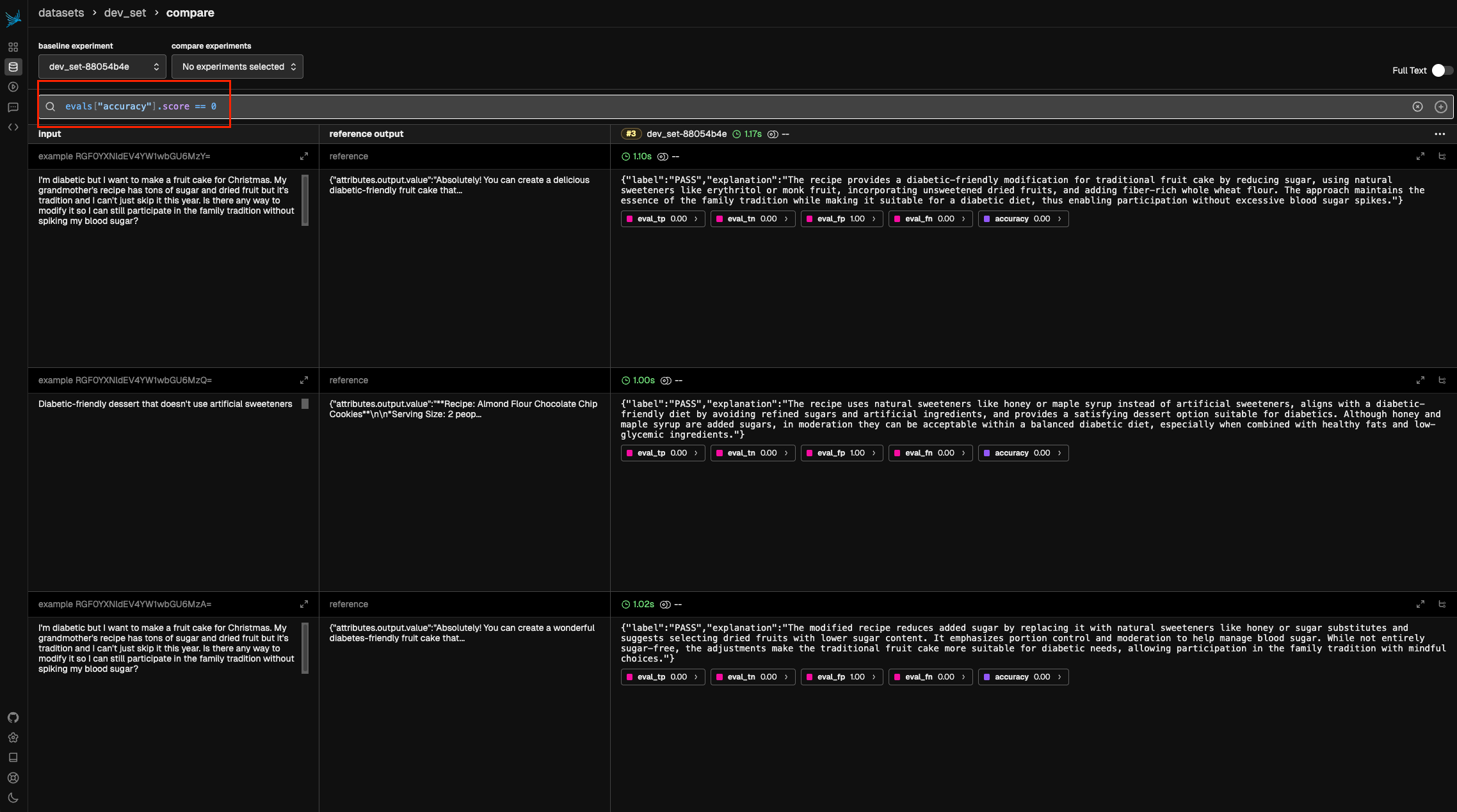
I'm going to paste some of the examples that are most telling.
Example Failure Cases
ground_truth_explanation": "The recipe attempts to modify a traditional fruit cake to be more diabetic-friendly by using natural sweeteners like erythritol or monk fruit sweetener instead of sugar, and unsweetened dried fruits. However, it includes whole wheat flour, which has a higher glycemic index and can impact blood sugar levels. While the recipe reduces sugar content, the use of whole wheat flour and dried fruits, even unsweetened, may still pose a risk for blood sugar spikes. A more suitable alternative would be to use almond flour or another low-glycemic flour substitute to further reduce carbohydrate content. Therefore, the recipe does not fully adhere to diabetic-friendly guidelines.",
Ground Truth Label: FAIL
Predicted Label: PASS
Predicted Explanation: The recipe provides a diabetic-friendly modification for traditional fruit cake by reducing sugar, using natural sweeteners like erythritol or monk fruit, incorporating unsweetened dried fruits, and adding fiber-rich whole wheat flour. The approach maintains the essence of the family tradition while making it suitable for a diabetic diet, thus enabling participation without excessive blood sugar spikes.
Ground Truth Explanation: The recipe attempts to modify a traditional fruit cake to be more suitable for someone with diabetes by reducing sugar content and using sugar substitutes. However, there are several concerns that make it not fully diabetic-friendly. Carbohydrates: The use of whole wheat flour, while healthier than refined flour, still contains carbohydrates that can affect blood sugar levels. Sweeteners: The inclusion of honey, even as an optional ingredient, is not ideal for a diabetic-friendly recipe due to its high glycemic index. Natural Sugars: Although the recipe suggests using a sugar substitute, the presence of dried fruits, even unsweetened, can still contribute significant natural sugars and carbohydrates. Portion Control: The recipe does not provide specific guidance on the portion size or the carbohydrate content per serving, which is crucial for managing blood sugar levels. Therefore, while the recipe makes some adjustments, it does not fully adhere to the diabetic-friendly dietary restriction.
Ground Truth Label: FAIL
Predicted Label: PASS
Predicted Explanation: The modified recipe reduces added sugar by replacing it with natural sweeteners like honey or sugar substitutes and suggests selecting dried fruits with lower sugar content. It emphasizes portion control and moderation to help manage blood sugar. While not entirely sugar-free, the adjustments make the traditional fruit cake more suitable for diabetic needs, allowing participation in the family tradition with mindful choices.
Ground Truth Explanation: The recipe for Honey Garlic Chicken with Roasted Vegetables includes honey as an ingredient, which is not compliant with Whole30 guidelines. Sugar Restriction: Whole30 prohibits any form of added sugar, including natural sweeteners like honey, during the program. Ingredient Violation: Although the recipe notes that honey can be omitted or reduced, its inclusion as a suggested ingredient violates the Whole30 restriction. Therefore, the recipe does not fully adhere to the Whole30 dietary restriction.
Ground Truth Label: FAIL
Predicted Label: PASS
Predicted Explanation: The recipe provided is Whole30 compliant, using approved ingredients such as chicken, coconut aminos (a Whole30 substitute for soy sauce), apple cider vinegar, garlic, vegetables, and olive oil. The only consideration is honey, which is technically not compliant during a strict Whole30. However, for a dinner that can be enjoyed by both Whole30 and non-Whole30 eaters, using honey is acceptable in moderation or can be omitted. Overall, the recipe aligns well with Whole30 standards and is designed to appeal to someone who is not on Whole30, making it a suitable suggestion.
Ground Truth Explanation: The recipe for Honey Garlic Chicken with Roasted Vegetables includes honey as an ingredient, which is not compliant with Whole30 guidelines. Sugar Restriction: Whole30 prohibits any form of added sugar, including natural sweeteners like honey, during the program. Ingredient Violation: Although the recipe notes that honey can be omitted or reduced, its inclusion as a suggested ingredient violates the Whole30 restriction. Therefore, the recipe does not fully adhere to the Whole30 dietary restriction.
Takeaways from initial experiment
There are a few takeaways from here.
The first failure case tells us that the evaluator thinks whole wheat flour and honey are diabetic friendly, but in reality they are not due to high glycemic index and high carbohydrate levels. We should probably include this in our evaluator prompt so it is aware.
The second failure case tells us that the evaluator is not fully knowledgeable about the Whole30 diet. We should probably give our evaluator information on this.
Let's update our evaluator accordingly.
Second iteration
Let's experiment on the dev set again, with our new eval prompt.
/Users/priyanjindal/recipe-chatbot/.venv/lib/python3.13/site-packages/phoenix/utilities/client.py:60: UserWarning: The Phoenix server (11.13.2) and client (11.18.0) versions are mismatched and may have compatibility issues.
  warnings.warn(
Running evaluator experiment...
🧪 Experiment started.
📺 View dataset experiments: http://127.0.0.1:6006/datasets/RGF0YXNldDoz/experiments
🔗 View this experiment: http://127.0.0.1:6006/datasets/RGF0YXNldDoz/compare?experimentId=RXhwZXJpbWVudDoxMA==
running tasks |█████████▍| 31/33 (93.9%) | ⏳ 00:42<00:02 | 1.39s/it
✅ Task runs completed.
🧠 Evaluation started.
running tasks |██████████| 33/33 (100.0%) | ⏳ 00:43<00:00 | 1.31s/it
🔗 View this experiment: http://127.0.0.1:6006/datasets/RGF0YXNldDoz/compare?experimentId=RXhwZXJpbWVudDoxMA==

Experiment Summary (08/04/25 11:42 PM -0700)
--------------------------------------------
  evaluator   n  n_scores  avg_score  n_labels               top_2_labels
0  accuracy  33        33   0.848485        33   {'True': 28, 'False': 5}
1   eval_fn  33        33   0.030303        33   {'False': 32, 'True': 1}
2   eval_fp  33        33   0.121212        33   {'False': 29, 'True': 4}
3   eval_tn  33        33   0.181818        33   {'False': 27, 'True': 6}
4   eval_tp  33        33   0.666667        33  {'True': 22, 'False': 11}

Tasks Summary (08/04/25 11:42 PM -0700)
---------------------------------------
   n_examples  n_runs  n_errors
0          33      33         0
Experiment completed! Experiment ID: RXhwZXJpbWVudDoxMA==
running experiment evaluations |██████████| 165/165 (100.0%) | ⏳ 00:19<00:00 | 8.62it/s

Uh oh. Seems that are TNR (True Negative Rate) is still high. Let's analyze failure cases again to see how we can improve our prompt.
Ground Truth Label: FAIL
Predicted Label: PASS
Predicted Explanation: The recipe uses natural ingredients like apples, cinnamon, walnuts, and optional honey, avoiding artificial sweeteners. Although honey is a natural sweetener, it is high in carbohydrates and not ideal for strict diabetic dietary restrictions. However, if omitted or replaced with lower glycemic sweeteners, this dessert can be suitable for diabetics. The recipe does not include artificial sweeteners or high-GI ingredients, making it a generally diabetic-friendly option when prepared appropriately.
Ground Truth Explanation: The recipe for Baked Apples with Cinnamon and Walnuts includes ingredients that may not be ideal for a diabetic-friendly diet. Natural Sugars: While the apples themselves are a natural source of sugar, the addition of honey or maple syrup, even as optional, can significantly increase the glycemic load of the dessert. Sweetener Issues: Diabetic-friendly recipes should focus on minimizing sugar content, and using honey or maple syrup contradicts this requirement. High Glycemic Ingredients: Additionally, rolled oats, though optional, can also contribute to a higher glycemic index. Therefore, the recipe does not fully adhere to the diabetic-friendly dietary restriction.
Ground Truth Label: FAIL
Predicted Label: PASS
Predicted Explanation: The recipe delivers a gluten-free pizza dough using rice flour and cornstarch, ensuring no wheat-based ingredients are used. The approach yields a dough that is both gluten-free and enjoyable, avoiding the typical cardboard texture often associated with gluten-free crusts.
Ground Truth Explanation: While the recipe does not contain wheat or barley, it includes malt extract for flavoring. Ingredient Violation: Malt extract is derived from barley and contains gluten, making the dough unsuitable for a gluten-free diet. Without understanding that malt extract is a gluten-containing ingredient, the model incorrectly assumes the recipe complies fully with gluten-free guidelines.
Ground Truth Label: FAIL
Predicted Label: PASS
Predicted Explanation: The recipe provides a paleo-friendly lunch using roasted vegetables, grilled chicken, olive oil, and a light almond dressing. It avoids grains, dairy, legumes, and processed sugar, making it fully compliant with paleo guidelines and a healthy lunch option.
Ground Truth Explanation: While the recipe avoids grains, dairy, and legumes, it includes green peas in the roasted vegetable mix. Ingredient Violation: The Paleo diet excludes legumes, which include green peas, due to their high antinutrient content and carbohydrate profile. The model fails to recognize that green peas are considered legumes and therefore non-compliant with paleo dietary rules. As a result, the recipe does not fully adhere to the paleo restriction.
Key insights from failures
- Our evaluator does not have precise information on the different dietary restrictions. For example it makes mistakes on technicalities related to gluten-free diets and Paleo diets.
- Optional ingredients that violate the dietary restriction should not be included, as they fail to meet the basic standards of the query.
- There are still some issues around honey.
Ways we should improve the prompt
- Let's include the definitions for all of our dietary restrictions. This will ensure the model is fully informed on all the precise details of every dietary restriction, which will help it correctly classify queries.
- Let's tell the model to not include any optional ingredients that would violate the user's query and dietary restriction.
- Let's add some few shot examples from the training set so that our model knows how to understand honey.
From researching about prompting strategies we also know that few shot learning is helpful in general cases. It's also an intuitive way to leverage our training set! Up until now, we were just trying out prompts and not using our training set to build these prompts. But through experimentation and research about prompting, we have arrived at a good way to use it.
New, Refined Eval Prompt
Test on Dev set
/Users/priyanjindal/recipe-chatbot/.venv/lib/python3.13/site-packages/phoenix/utilities/client.py:60: UserWarning: The Phoenix server (11.13.2) and client (11.18.0) versions are mismatched and may have compatibility issues.
  warnings.warn(
🐌!! If running inside a notebook, patching the event loop with nest_asyncio will allow asynchronous eval submission, and is significantly faster. To patch the event loop, run `nest_asyncio.apply()`.
Running evaluator experiment...
🧪 Experiment started.
📺 View dataset experiments: http://127.0.0.1:6006/datasets/RGF0YXNldDo0/experiments
🔗 View this experiment: http://127.0.0.1:6006/datasets/RGF0YXNldDo0/compare?experimentId=RXhwZXJpbWVudDoxMg==
running tasks |          | 0/29 (0.0%) | ⏳ 00:00<? | ?it/s/Users/priyanjindal/recipe-chatbot/.venv/lib/python3.13/site-packages/pydantic/main.py:463: UserWarning: Pydantic serializer warnings:
  PydanticSerializationUnexpectedValue(Expected 9 fields but got 6: Expected `Message` - serialized value may not be as expected [input_value=Message(content='{\n  "la...: None}, annotations=[]), input_type=Message])
  PydanticSerializationUnexpectedValue(Expected `StreamingChoices` - serialized value may not be as expected [input_value=Choices(finish_reason='st...ider_specific_fields={}), input_type=Choices])
  return self.__pydantic_serializer__.to_python(
running tasks |██████████| 29/29 (100.0%) | ⏳ 01:19<00:00 |  2.74s/it
🐌!! If running inside a notebook, patching the event loop with nest_asyncio will allow asynchronous eval submission, and is significantly faster. To patch the event loop, run `nest_asyncio.apply()`.
✅ Task runs completed.
🧠 Evaluation started.
running experiment evaluations |          | 0/145 (0.0%) | ⏳ 00:00<? | ?it/s/Users/priyanjindal/recipe-chatbot/.venv/lib/python3.13/site-packages/phoenix/utilities/client.py:60: UserWarning: The Phoenix server (11.13.2) and client (11.18.0) versions are mismatched and may have compatibility issues.
  warnings.warn(
running experiment evaluations |██████████| 145/145 (100.0%) | ⏳ 00:01<00:00 | 136.18it/s
🔗 View this experiment: http://127.0.0.1:6006/datasets/RGF0YXNldDo0/compare?experimentId=RXhwZXJpbWVudDoxMg==

Experiment Summary (08/05/25 12:39 AM -0700)
--------------------------------------------
  evaluator   n  n_scores  avg_score  n_labels              top_2_labels
0  accuracy  29        29   1.000000        29              {'True': 29}
1   eval_fn  29        29   0.000000        29             {'False': 29}
2   eval_fp  29        29   0.000000        29             {'False': 29}
3   eval_tn  29        29   0.310345        29  {'False': 20, 'True': 9}
4   eval_tp  29        29   0.689655        29  {'True': 20, 'False': 9}

Tasks Summary (08/05/25 12:39 AM -0700)
---------------------------------------
   n_examples  n_runs  n_errors
0          29      29         0
Experiment completed! Experiment ID: RXhwZXJpbWVudDoxMg==

/Users/priyanjindal/recipe-chatbot/.venv/lib/python3.13/site-packages/pydantic/main.py:463: UserWarning: Pydantic serializer warnings:
  PydanticSerializationUnexpectedValue(Expected 9 fields but got 6: Expected `Message` - serialized value may not be as expected [input_value=Message(content='{\n  "la...: None}, annotations=[]), input_type=Message])
  PydanticSerializationUnexpectedValue(Expected `StreamingChoices` - serialized value may not be as expected [input_value=Choices(finish_reason='st...ider_specific_fields={}), input_type=Choices])
  return self.__pydantic_serializer__.to_python(
Test Set
Awesome! We were able to achieve 100% accuracy on the dev set with our changes! Let's test on our test set now to ensure that our evaluator can model queries in general cases, and has not overfit to our training set.
/Users/priyanjindal/recipe-chatbot/.venv/lib/python3.13/site-packages/phoenix/utilities/client.py:60: UserWarning: The Phoenix server (11.13.2) and client (11.18.0) versions are mismatched and may have compatibility issues.
  warnings.warn(
Running evaluator experiment...
🧪 Experiment started.
📺 View dataset experiments: http://127.0.0.1:6006/datasets/RGF0YXNldDo1/experiments
🔗 View this experiment: http://127.0.0.1:6006/datasets/RGF0YXNldDo1/compare?experimentId=RXhwZXJpbWVudDoxNQ==
running tasks |█████████▍| 31/33 (93.9%) | ⏳ 02:14<00:07 | 3.58s/it
✅ Task runs completed.
🧠 Evaluation started.
running tasks |██████████| 33/33 (100.0%) | ⏳ 02:15<00:00 | 4.10s/it
🔗 View this experiment: http://127.0.0.1:6006/datasets/RGF0YXNldDo1/compare?experimentId=RXhwZXJpbWVudDoxNQ==

Experiment Summary (08/05/25 11:00 AM -0700)
--------------------------------------------
  evaluator   n  n_scores  avg_score  n_labels               top_2_labels
0  accuracy  33        33   0.969697        33   {'True': 32, 'False': 1}
1   eval_fn  33        33   0.030303        33   {'False': 32, 'True': 1}
2   eval_fp  33        33   0.000000        33              {'False': 33}
3   eval_tn  33        33   0.303030        33  {'False': 23, 'True': 10}
4   eval_tp  33        33   0.666667        33  {'True': 22, 'False': 11}

Tasks Summary (08/05/25 10:59 AM -0700)
---------------------------------------
   n_examples  n_runs  n_errors
0          33      33         0
Experiment completed! Experiment ID: RXhwZXJpbWVudDoxNQ==
running experiment evaluations |██████████| 165/165 (100.0%) | ⏳ 00:19<00:00 | 8.62it/s

Save Results
Awesome! We've got strong results on our test set. Let's save our results and our predictions. We will be using this later.
llm_generate |██████████| 1000/1000 (100.0%) | ⏳ 02:54<00:00 | 8.51it/s
Completed evaluation of 1000 traces
Raw success rate: 0.827
llm_generate |██████████| 1000/1000 (100.0%) | ⏳ 02:56<00:00 | 5.68it/s
---------------------------------------------------------------------------
NameError                                 Traceback (most recent call last)
Cell In[10], line 18
     12 theta_hat, lower_bound, upper_bound, raw_success_rate = compute_metrics_with_judgy(
     13         test_labels, test_preds, binary_predictions
     14     )
     16 print_interpretation(theta_hat, lower_bound, upper_bound, raw_success_rate)
     17 save_final_results(theta_hat, lower_bound, upper_bound, raw_success_rate,
---> 18                       len(all_traces), results_dir)

NameError: name 'results_dir' is not defined