Couchbase Langgraph Agentic Rag

Evaluating Agentic RAG using Arize + Couchbase
This tutorial is adapted from the Langgraph Agentic RAG notebook.
This guide shows you how to create a Retrieval Augmented Generation (RAG) Agent using Couchbase Vectorstore and evaluate performance with Arize. Agentic RAG combines RAG with the power of agents. Retrieval Agents are useful when we want to make decisions about whether to retrieve from an index. To implement a Retrieval Agent, we simply need to give an LLM access to a retriever tool.
We'll go through the following steps:
-
Create a Agentic RAG QA chatbot with OpenAI, Langgraph, Couchbase and Agent Catalog
-
Trace the agent's function calls including retrieval and LLM calls using Arize
-
Create a dataset to benchmark performance
-
Evaluate performance using LLM as a judge
-
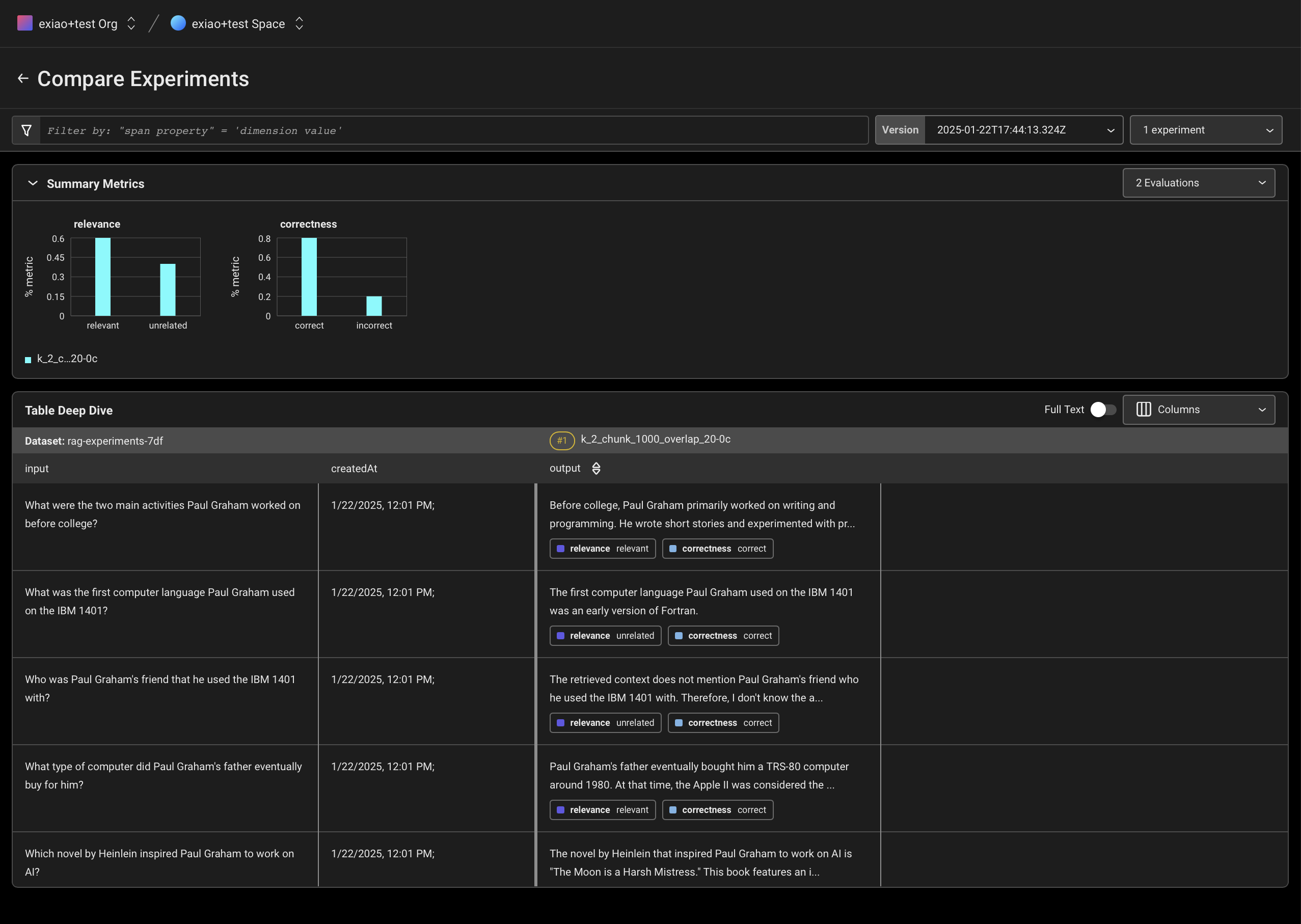
Experiment with different chunk sizes, overlaps, and k number of documents retrieved to see how these affect the performance of the Agentic RAG
-
Compare these experiments in Arize
Notebook Setup
First, let's download the required packages and set our API keys:
Set API Keys
To follow along with this tutorial, you'll need to sign up for Arize and get your Space, API and Developer keys. You can see the guide here. You will also need an OpenAI key.
Set up Arize Tracing
Setup Couchbase
You'll need to setup your Couchbase cluster by doing the following:
- Create an account at Couchbase Cloud
- Create a free cluster with the Data, Index, and Search services enabled*
- Create cluster access credentials
- Allow access to the cluster from your local machine
- Create a bucket to store your documents
*The Search Service will be used to perform Semantic Search later when we use Agent catalog.
Initialize Couchbase cluster
Once you've setup your cluster, you can connect to it using langchain's couchbase package.
Collect the following information from your cluster:
- Connection string
- Username
- Password
- Bucket name
- Scope name
- Collection name
Before this step, you must also create a search index. You can do this by going to the Couchbase UI and clicking on the "Search" tab. Make sure the names match up with the ones we've defined above.
Link below: https://docs.couchbase.com/cloud/vector-search/create-vector-search-index-ui.html
Since we will test multiple runs, we create a convenience function that will reset the vector store with new different chunk sizes and overlaps. Documents content will be sourced from 3 blog posts by Lilian Weng.
Retriever Tool
Create tools and prompts with Agent Catalog
Fetch our retriever tool from the Agent Catalog using the agentc provider. In the future, when more tools (and/or prompts) are required and the application grows more complex, Agent Catalog SDK and CLI can be used to automatically fetch the tools based on the use case (semantic search) or by name.
For instructions on how this tool was created and more capabilities of Agent catalog, please refer to the documentation here.
Create Agent
Agent State
We will define a graph of agents to help all involved agents communicate with each other better.
Agents communicate through a state object that is passed around to each node and modified with output from that node.
Our state will be a list of messages and each node in our graph will append to it.
Define the Nodes and Edges
We can lay out an agentic RAG graph like this:
- The state is a set of messages
- Each node will update (append to) state
- Conditional edges decide which node to visit next
Define Graph
- Start with an agent,
call_model - Agent makes a decision to call a function
- If so, then
actionto call tool (retriever) - Then call agent with the tool output added to messages (
state)
Let's visualize the graph!
Let's run the graph!
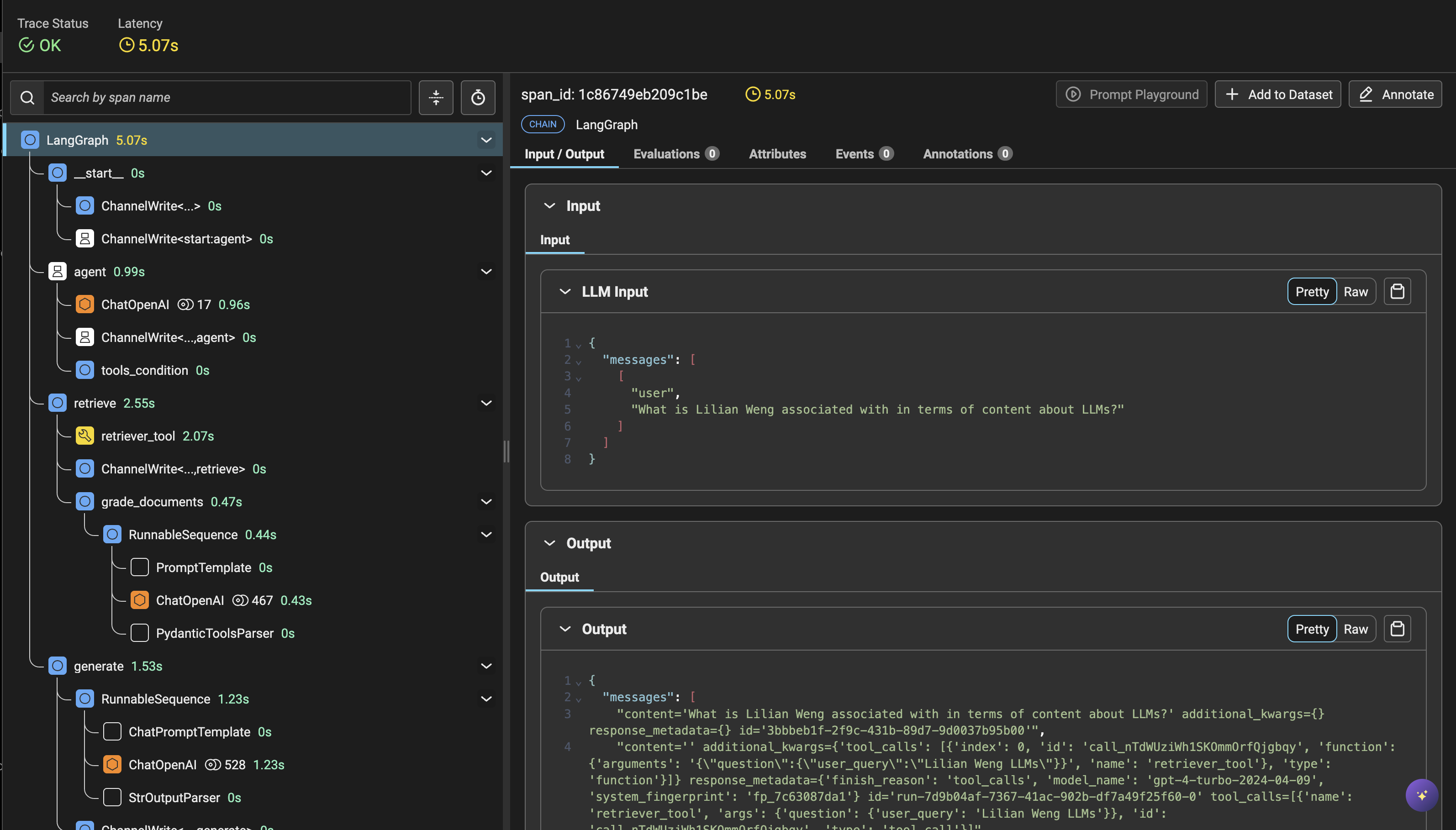
View the trace in the Arize UI
Once you've run a single query, you can see the trace in the Arize UI with each step taken by the retriever, the embedding, and the LLM query.
Click through the queries to better understand how the query engine is performing. Arize can be used to understand and troubleshoot your RAG app by surfacing:
- Application latency
- Token usage
- Runtime exceptions
- Retrieved documents
- Embeddings
- LLM parameters
- Prompt templates
- Tool descriptions
- LLM function calls
- And more!
Generate a synthetic dataset of questions
We will run our Agent against the dataset of questions we generate, and then evaluate the results.
Run our Agent against the list of generated questions
Evaluating your Agentic RAG using LLM as a Judge
Now that we have run a set of test cases, we can create evaluators to measure performance of our run. This way, we don't have to manually inspect every single trace to see if the LLM is doing the right thing. First, we'll define the prompts for the evaluators.
There are two evaluators we will use for this example.
- Retrieval Relevance: This evaluator checks if the reference text selected by the retriever is relevant to the question.
- QA Correctness: This evaluator checks if the answer correctly answers the question based on the reference text provided.
(For more information on these and other prebuilt evaluators see here.)
We will be creating an LLM as a judge using prebuilt prompt templates, taking the spans recorded by Phoenix, and then giving them labels using the llm_classify function. This function uses LLMs to evaluate your LLM calls and gives them labels and explanations. You can read more detail here.
Let's look at and inspect the results of our evaluatiion!
Experiment with different k-values and chunk sizes
Re-run experiments with different k-values and chunk sizes. Then log the results to Arize to see how the performance changes.
Let's setup our evaluators to see how the performance changes.
Let's log these results to Arize and see how they compare.
First we'll create a dataset to store our questions.
Next we'll define which columns of our dataframe will be mapped to outputs and which will be mapped to evaluation labels and explanations..
Now let's run it for each of our experiments.
You can compare the experiment results in the Arize UI and see how each RAG method performs. How did these changes impact performance?