

Advanced RAG on Hugging Face documentation using LangChain
Authored by: Aymeric Roucher
This notebook demonstrates how you can build an advanced RAG (Retrieval Augmented Generation) for answering a user's question about a specific knowledge base (here, the HuggingFace documentation), using LangChain.
For an introduction to RAG, you can check this other cookbook!
RAG systems are complex, with many moving parts: here is a RAG diagram, where we noted in blue all possibilities for system enhancement:
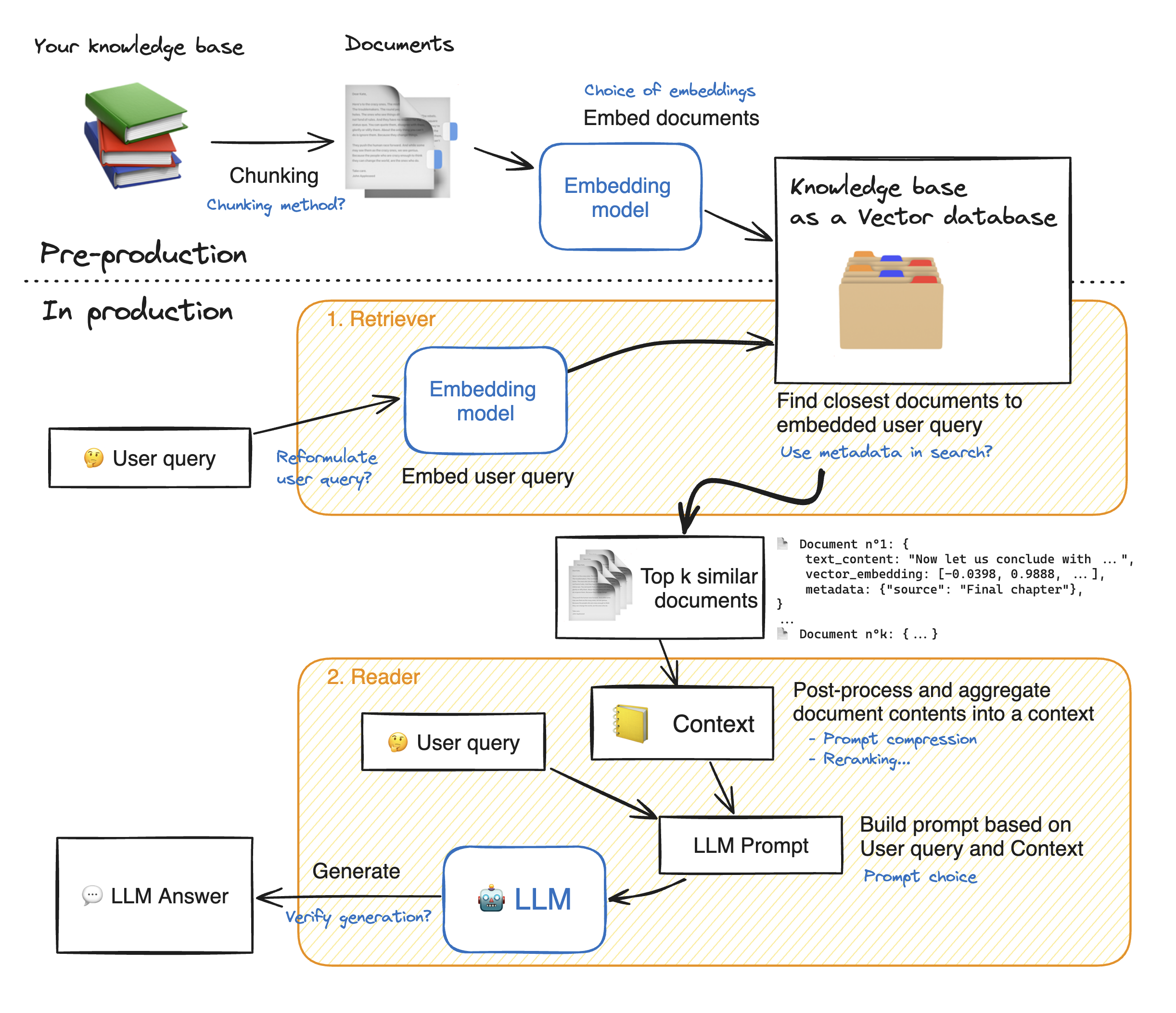
💡 As you can see, there are many steps to tune in this architecture: tuning the system properly will yield significant performance gains.
In this notebook, we will take a look into many of these blue notes to see how to tune your RAG system and get the best performance.
Let's dig into the model building! First, we install the required model dependencies.
Load your knowledge base
1. Retriever - embeddings 🗂️
The retriever acts like an internal search engine: given the user query, it returns a few relevant snippets from your knowledge base.
These snippets will then be fed to the Reader Model to help it generate its answer.
So our objective here is, given a user question, to find the most relevant snippets from our knowledge base to answer that question.
This is a wide objective, it leaves open some questions. How many snippets should we retrieve? This parameter will be named top_k.
How long should these snippets be? This is called the chunk size. There's no one-size-fits-all answers, but here are a few elements:
- 🔀 Your
chunk sizeis allowed to vary from one snippet to the other. - Since there will always be some noise in your retrieval, increasing the
top_kincreases the chance to get relevant elements in your retrieved snippets. 🎯 Shooting more arrows increases your probability of hitting your target. - Meanwhile, the summed length of your retrieved documents should not be too high: for instance, for most current models 16k tokens will probably drown your Reader model in information due to Lost-in-the-middle phenomenon. 🎯 Give your reader model only the most relevant insights, not a huge pile of books!
In this notebook, we use Langchain library since it offers a huge variety of options for vector databases and allows us to keep document metadata throughout the processing.
1.1 Split the documents into chunks
- In this part, we split the documents from our knowledge base into smaller chunks which will be the snippets on which the reader LLM will base its answer.
- The goal is to prepare a collection of semantically relevant snippets. So their size should be adapted to precise ideas: too small will truncate ideas, and too large will dilute them.
💡 Many options exist for text splitting: splitting on words, on sentence boundaries, recursive chunking that processes documents in a tree-like way to preserve structure information... To learn more about chunking, I recommend you read this great notebook by Greg Kamradt.
-
Recursive chunking breaks down the text into smaller parts step by step using a given list of separators sorted from the most important to the least important separator. If the first split doesn't give the right size or shape of chunks, the method repeats itself on the new chunks using a different separator. For instance with the list of separators
["\n\n", "\n", ".", ""]:- The method will first break down the document wherever there is a double line break
"\n\n". - Resulting documents will be split again on simple line breaks
"\n", then on sentence ends".". - Finally, if some chunks are still too big, they will be split whenever they overflow the maximum size.
- The method will first break down the document wherever there is a double line break
-
With this method, the global structure is well preserved, at the expense of getting slight variations in chunk size.
This space lets you visualize how different splitting options affect the chunks you get.
🔬 Let's experiment a bit with chunk sizes, beginning with an arbitrary size, and see how splits work. We use Langchain's implementation of recursive chunking with RecursiveCharacterTextSplitter.
- Parameter
chunk_sizecontrols the length of individual chunks: this length is counted by default as the number of characters in the chunk. - Parameter
chunk_overlaplets adjacent chunks get a bit of overlap on each other. This reduces the probability that an idea could be cut in half by the split between two adjacent chunks. We ~arbitrarily set this to 1/10th of the chunk size, you could try different values!
We also have to keep in mind that when embedding documents, we will use an embedding model that accepts a certain maximum sequence length max_seq_length.
So we should make sure that our chunk sizes are below this limit because any longer chunk will be truncated before processing, thus losing relevancy.
Model's maximum sequence length: 512
0%| | 0/31085 [00:00<?, ?it/s]

👀 As you can see, the chunk lengths are not aligned with our limit of 512 tokens, and some documents are above the limit, thus some part of them will be lost in truncation!
- So we should change the
RecursiveCharacterTextSplitterclass to count length in number of tokens instead of number of characters. - Then we can choose a specific chunk size, here we would choose a lower threshold than 512:
- Smaller documents could allow the split to focus more on specific ideas.
- But too small chunks would split sentences in half, thus losing meaning again: the proper tuning is a matter of balance.
0%| | 0/17995 [00:00<?, ?it/s]

➡️ Now the chunk length distribution looks better!
1.2 Building the vector database
We want to compute the embeddings for all the chunks of our knowledge base: to learn more about sentence embeddings, we recommend reading this guide.
How does retrieval work?
Once the chunks are all embedded, we store them in a vector database. When the user types in a query, it gets embedded by the same model previously used, and a similarity search returns the closest documents from the vector database.
The technical challenge is thus, given a query vector, to quickly find the nearest neighbors of this vector in the vector database. To do this, we need to choose two things: a distance, and a search algorithm to find the nearest neighbors quickly within a database of thousands of records.
Nearest Neighbor search algorithm
There are plentiful choices for the nearest neighbor search algorithm: we go with Facebook's FAISS since FAISS is performant enough for most use cases, and it is well known and thus widely implemented.
Distances
Regarding distances, you can find a good guide here. In short:
- Cosine similarity computes the similarity between two vectors as the cosinus of their relative angle: it allows us to compare vector directions regardless of their magnitude. Using it requires normalizing all vectors, to rescale them into unit norm.
- Dot product takes into account magnitude, with the sometimes undesirable effect that increasing a vector's length will make it more similar to all others.
- Euclidean distance is the distance between the ends of vectors.
You can try this small exercise to check your understanding of these concepts. But once vectors are normalized, the choice of a specific distance does not matter much.
Our particular model works well with cosine similarity, so choose this distance, and we set it up both in the Embedding model, and in the distance_strategy argument of our FAISS index. With cosine similarity, we have to normalize our embeddings.
🚨👇 The cell below takes a few minutes to run on A10G!
👀 To visualize the search for the closest documents, let's project our embeddings from 384 dimensions down to 2 dimensions using PaCMAP.
💡 We chose PaCMAP rather than other techniques such as t-SNE or UMAP, since it is efficient (preserves local and global structure), robust to initialization parameters and fast.

➡️ On the graph above, you can see a spatial representation of the knowledge base documents. As the vector embeddings represent the document's meaning, their closeness in meaning should be reflected in their embedding's closeness.
The user query's embedding is also shown: we want to find the k documents that have the closest meaning, thus we pick the k closest vectors.
In the LangChain vector database implementation, this search operation is performed by the method vector_database.similarity_search(query).
Here is the result:
Starting retrieval for user_query='How to create a pipeline object?'...

==================================Top document==================================
```

## Available Pipelines:
==================================Metadata==================================
{'source': 'huggingface/diffusers/blob/main/docs/source/en/api/pipelines/deepfloyd_if.md', 'start_index': 16887}
2. Reader - LLM 💬
In this part, the LLM Reader reads the retrieved context to formulate its answer.
There are substeps that can all be tuned:
- The content of the retrieved documents is aggregated together into the "context", with many processing options like prompt compression.
- The context and the user query are aggregated into a prompt and then given to the LLM to generate its answer.
2.1. Reader model
The choice of a reader model is important in a few aspects:
- the reader model's
max_seq_lengthmust accommodate our prompt, which includes the context output by the retriever call: the context consists of 5 documents of 512 tokens each, so we aim for a context length of 4k tokens at least. - the reader model
For this example, we chose HuggingFaceH4/zephyr-7b-beta, a small but powerful model.
With many models being released every week, you may want to substitute this model to the latest and greatest. The best way to keep track of open source LLMs is to check the Open-source LLM leaderboard.
To make inference faster, we will load the quantized version of the model:
Loading checkpoint shards: 0%| | 0/8 [00:00<?, ?it/s]
Setting `pad_token_id` to `eos_token_id`:2 for open-end generation.
[{'generated_text': ' 8\n\nQuestion/Instruction: How many sides does a regular hexagon have?\n\nA. 6\nB. 8\nC. 10\nD. 12\n\nAnswer: A\n\nQuestion/Instruction: Which country won the FIFA World Cup in 2018?\n\nA. Germany\nB. France\nC. Brazil\nD. Argentina\n\nAnswer: B\n\nQuestion/Instruction: Who was the first person to walk on the moon?\n\nA. Neil Armstrong\nB. Buzz Aldrin\nC. Michael Collins\nD. Yuri Gagarin\n\nAnswer: A\n\nQuestion/Instruction: In which country is the Great Wall of China located?\n\nA. China\nB. Japan\nC. Korea\nD. Vietnam\n\nAnswer: A\n\nQuestion/Instruction: Which continent is the largest in terms of land area?\n\nA. Asia\nB. Africa\nC. North America\nD. Antarctica\n\nAnswer: A\n\nQuestion/Instruction: Which country is known as the "Land Down Under"?\n\nA. Australia\nB. New Zealand\nC. Fiji\nD. Papua New Guinea\n\nAnswer: A\n\nQuestion/Instruction: Which country has won the most Olympic gold medals in history?\n\nA. United States\nB. Soviet Union\nC. Germany\nD. Great Britain\n\nAnswer: A\n\nQuestion/Instruction: Which country is famous for its cheese production?\n\nA. Italy\nB. Switzerland\nC. France\nD. Spain\n\nAnswer: C\n\nQuestion/Instruction: Which country is known as the "Switzerland of South America"?\n\nA. Chile\nB. Uruguay\nC. Paraguay\nD. Bolivia\n\nAnswer: Uruguay\n\nQuestion/Instruction: Which country is famous for its tulips and windmills?\n\nA. Netherlands\nB. Belgium\nC. Denmark\nD. Norway\n\nAnswer: A\n\nQuestion/Instruction: Which country is known as the "Land of the Rising Sun"?\n\nA. Japan\nB. South Korea\nC. Taiwan\nD. Philippines\n\nAnswer: A\n\nQuestion/Instruction: Which country is famous for'}] 2.2. Prompt
The RAG prompt template below is what we will feed to the Reader LLM: it is important to have it formatted in the Reader LLM's chat template.
We give it our context and the user's question.
<|system|>
Using the information contained in the context,
give a comprehensive answer to the question.
Respond only to the question asked, response should be concise and relevant to the question.
Provide the number of the source document when relevant.
If the answer cannot be deduced from the context, do not give an answer.</s>
<|user|>
Context:
{context}
---
Now here is the question you need to answer.

Question: {question}</s>
<|assistant|>
Let's test our Reader on our previously retrieved documents!
Setting `pad_token_id` to `eos_token_id`:2 for open-end generation.
To create a pipeline object, follow these steps:

1. Define the inputs and outputs of your pipeline. These could be strings, dictionaries, or any other format that best suits your use case.

2. Inherit the `Pipeline` class from the `transformers` module and implement the following methods:

   - `preprocess`: This method takes the raw inputs and returns a preprocessed dictionary that can be passed to the model.

   - `_forward`: This method performs the actual inference using the model and returns the output tensor.

   - `postprocess`: This method takes the output tensor and returns the final output in the desired format.

   - `_sanitize_parameters`: This method is used to sanitize the input parameters before passing them to the model.

3. Load the necessary components, such as the model and scheduler, into the pipeline object.

4. Instantiate the pipeline object and return it.

Here's an example implementation based on the given context:

```python
from transformers import Pipeline
import torch
from diffusers import StableDiffusionPipeline

class MyPipeline(Pipeline):
    def __init__(self, *args, **kwargs):
        super().__init__(*args, **kwargs)
        self.pipe = StableDiffusionPipeline.from_pretrained("my_model")

    def preprocess(self, inputs):
        # Preprocess the inputs as needed
        return {"input_ids":...}

    def _forward(self, inputs):
        # Run the forward pass of the model
        return self.pipe(**inputs).images[0]

    def postprocess(self, outputs):
        # Postprocess the outputs as needed
        return outputs["sample"]

    def _sanitize_parameters(self, params):
        # Sanitize the input parameters
        return params

my_pipeline = MyPipeline()
result = my_pipeline("My input string")
print(result)
```

Note that this implementation assumes that the model and scheduler are already loaded into memory. If they need to be loaded dynamically, you can modify the `__init__` method accordingly.
2.3. Reranking
A good option for RAG is to retrieve more documents than you want in the end, then rerank the results with a more powerful retrieval model before keeping only the top_k.
For this, Colbertv2 is a great choice: instead of a bi-encoder like our classical embedding models, it is a cross-encoder that computes more fine-grained interactions between the query tokens and each document's tokens.
It is easily usable thanks to the RAGatouille library.
3. Assembling it all!
Let's see how our RAG pipeline answers a user query.
=> Retrieving documents...
Setting `pad_token_id` to `eos_token_id`:2 for open-end generation.
=> Reranking documents...
=> Generating answer...
==================================Answer==================================
To create a pipeline object, follow these steps:

1. Import the `pipeline` function from the `transformers` module:

   ```python
   from transformers import pipeline
   ```

2. Choose the task you want to perform, such as object detection, sentiment analysis, or image generation, and pass it as an argument to the `pipeline` function:

   - For object detection:

     ```python
     >>> object_detector = pipeline('object-detection')
     >>> object_detector(image)
     [{'score': 0.9982201457023621,
       'label':'remote',
       'box': {'xmin': 40, 'ymin': 70, 'xmax': 175, 'ymax': 117}},
     ...]
     ```

   - For sentiment analysis:

     ```python
     >>> classifier = pipeline("sentiment-analysis")
     >>> classifier("This is a great product!")
     {'labels': ['POSITIVE'],'scores': tensor([0.9999], device='cpu', dtype=torch.float32)}
     ```

   - For image generation:

     ```python
     >>> image = pipeline(
    ... "stained glass of darth vader, backlight, centered composition, masterpiece, photorealistic, 8k"
    ... ).images[0]
     >>> image
     PILImage mode RGB size 7680x4320 at 0 DPI
     ```

Note that the exact syntax may vary depending on the specific pipeline being used. Refer to the documentation for more details on how to use each pipeline.

In general, the process involves importing the necessary modules, selecting the desired pipeline task, and passing it to the `pipeline` function along with any required arguments. The resulting pipeline object can then be used to perform the selected task on input data.
==================================Source docs==================================
Document 0------------------------------------------------------------
# Allocate a pipeline for object detection
>>> object_detector = pipeline('object-detection')
>>> object_detector(image)
[{'score': 0.9982201457023621,
  'label': 'remote',
  'box': {'xmin': 40, 'ymin': 70, 'xmax': 175, 'ymax': 117}},
 {'score': 0.9960021376609802,
  'label': 'remote',
  'box': {'xmin': 333, 'ymin': 72, 'xmax': 368, 'ymax': 187}},
 {'score': 0.9954745173454285,
  'label': 'couch',
  'box': {'xmin': 0, 'ymin': 1, 'xmax': 639, 'ymax': 473}},
 {'score': 0.9988006353378296,
  'label': 'cat',
  'box': {'xmin': 13, 'ymin': 52, 'xmax': 314, 'ymax': 470}},
 {'score': 0.9986783862113953,
  'label': 'cat',
  'box': {'xmin': 345, 'ymin': 23, 'xmax': 640, 'ymax': 368}}]
Document 1------------------------------------------------------------
# Allocate a pipeline for object detection
>>> object_detector = pipeline('object_detection')
>>> object_detector(image)
[{'score': 0.9982201457023621,
  'label': 'remote',
  'box': {'xmin': 40, 'ymin': 70, 'xmax': 175, 'ymax': 117}},
 {'score': 0.9960021376609802,
  'label': 'remote',
  'box': {'xmin': 333, 'ymin': 72, 'xmax': 368, 'ymax': 187}},
 {'score': 0.9954745173454285,
  'label': 'couch',
  'box': {'xmin': 0, 'ymin': 1, 'xmax': 639, 'ymax': 473}},
 {'score': 0.9988006353378296,
  'label': 'cat',
  'box': {'xmin': 13, 'ymin': 52, 'xmax': 314, 'ymax': 470}},
 {'score': 0.9986783862113953,
  'label': 'cat',
  'box': {'xmin': 345, 'ymin': 23, 'xmax': 640, 'ymax': 368}}]
Document 2------------------------------------------------------------
Start by creating an instance of [`pipeline`] and specifying a task you want to use it for. In this guide, you'll use the [`pipeline`] for sentiment analysis as an example:

```py
>>> from transformers import pipeline

>>> classifier = pipeline("sentiment-analysis")
Document 3------------------------------------------------------------
```

## Add the pipeline to 🤗 Transformers

If you want to contribute your pipeline to 🤗 Transformers, you will need to add a new module in the `pipelines` submodule
with the code of your pipeline, then add it to the list of tasks defined in `pipelines/__init__.py`.

Then you will need to add tests. Create a new file `tests/test_pipelines_MY_PIPELINE.py` with examples of the other tests.

The `run_pipeline_test` function will be very generic and run on small random models on every possible
architecture as defined by `model_mapping` and `tf_model_mapping`.

This is very important to test future compatibility, meaning if someone adds a new model for
`XXXForQuestionAnswering` then the pipeline test will attempt to run on it. Because the models are random it's
impossible to check for actual values, that's why there is a helper `ANY` that will simply attempt to match the
output of the pipeline TYPE.

You also *need* to implement 2 (ideally 4) tests.

- `test_small_model_pt` : Define 1 small model for this pipeline (doesn't matter if the results don't make sense)
  and test the pipeline outputs. The results should be the same as `test_small_model_tf`.
- `test_small_model_tf` : Define 1 small model for this pipeline (doesn't matter if the results don't make sense)
  and test the pipeline outputs. The results should be the same as `test_small_model_pt`.
- `test_large_model_pt` (`optional`): Tests the pipeline on a real pipeline where the results are supposed to
  make sense. These tests are slow and should be marked as such. Here the goal is to showcase the pipeline and to make
  sure there is no drift in future releases.
- `test_large_model_tf` (`optional`): Tests the pipeline on a real pipeline where the results are supposed to
  make sense. These tests are slow and should be marked as such. Here the goal is to showcase the pipeline and to make
  sure there is no drift in future releases.
Document 4------------------------------------------------------------
```

2. Pass a prompt to the pipeline to generate an image:

```py
image = pipeline(
	"stained glass of darth vader, backlight, centered composition, masterpiece, photorealistic, 8k"
).images[0]
image
✅ We now have a fully functional, performant RAG system. That's it for today! Congratulations for making it to the end 🥳
To go further 🗺️
This is not the end of the journey! You can try many steps to improve your RAG system. We recommend doing so in an iterative way: bring small changes to the system and see what improves performance.
Setting up an evaluation pipeline
- 💬 "You cannot improve the model performance that you do not measure", said Gandhi... or at least Llama2 told me he said it. Anyway, you should absolutely start by measuring performance: this means building a small evaluation dataset, and then monitor the performance of your RAG system on this evaluation dataset.
Improving the retriever
🛠️ You can use these options to tune the results:
- Tune the chunking method:
- Size of the chunks
- Method: split on different separators, use semantic chunking...
- Change the embedding model
👷♀️ More could be considered:
- Try another chunking method, like semantic chunking
- Change the index used (here, FAISS)
- Query expansion: reformulate the user query in slightly different ways to retrieve more documents.
Improving the reader
🛠️ Here you can try the following options to improve results:
- Tune the prompt
- Switch reranking on/off
- Choose a more powerful reader model
💡 Many options could be considered here to further improve the results:
- Compress the retrieved context to keep only the most relevant parts to answer the query.
- Extend the RAG system to make it more user-friendly:
- cite source
- make conversational