

Automatic Embedding Tei Inference Endpoints
How to use Inference Endpoints to Embed Documents
Authored by: Derek Thomas
Goal
I have a dataset I want to embed for semantic search (or QA, or RAG), I want the easiest way to do embed this and put it in a new dataset.
Approach
I'm using a dataset from my favorite subreddit r/bestofredditorupdates. Because it has long entries, I will use the new jinaai/jina-embeddings-v2-base-en since it has an 8k context length. I will deploy this using Inference Endpoint to save time and money. To follow this tutorial, you will need to have already added a payment method. If you haven't, you can add one here in billing. To make it even easier, I'll make this fully API based.
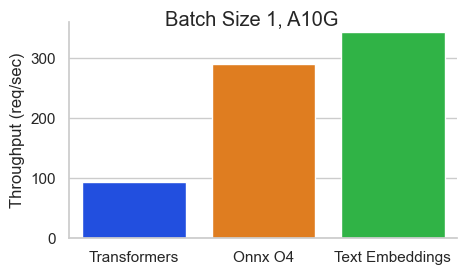
To make this MUCH faster I will use the Text Embeddings Inference image. This has many benefits like:
- No model graph compilation step
- Small docker images and fast boot times. Get ready for true serverless!
- Token based dynamic batching
- Optimized transformers code for inference using Flash Attention, Candle and cuBLASLt
- Safetensors weight loading
- Production ready (distributed tracing with Open Telemetry, Prometheus metrics)
Requirements
Imports
Config
DATASET_IN is where your text data is
DATASET_OUT is where your embeddings will be stored
Note I used 5 for the MAX_WORKERS since jina-embeddings-v2 are quite memory hungry.
Inference Endpoints offers a number of GPUs that you can choose from. Check the documentation for GPU and alternative accelerators for information.
[!TIP] You may need to email us for access to some architectures.
| Provider | Instance Type | Instance Size | Hourly rate | GPUs | Memory | Architecture |
|---|---|---|---|---|---|---|
| aws | nvidia-a10g | x1 | $1 | 1 | 24GB | NVIDIA A10G |
| aws | nvidia-t4 | x1 | $0.5 | 1 | 14GB | NVIDIA T4 |
| aws | nvidia-t4 | x4 | $3 | 4 | 56GB | NVIDIA T4 |
| gcp | nvidia-l4 | x1 | $0.8 | 1 | 24GB | NVIDIA L4 |
| gcp | nvidia-l4 | x4 | $3.8 | 4 | 96GB | NVIDIA L4 |
| aws | nvidia-a100 | x1 | $4 | 1 | 80GB | NVIDIA A100 |
| aws | nvidia-a10g | x4 | $5 | 4 | 96GB | NVIDIA A10G |
| aws | nvidia-a100 | x2 | $8 | 2 | 160GB | NVIDIA A100 |
| aws | nvidia-a100 | x4 | $16 | 4 | 320GB | NVIDIA A100 |
| aws | nvidia-a100 | x8 | $32 | 8 | 640GB | NVIDIA A100 |
| gcp | nvidia-t4 | x1 | $0.5 | 1 | 16GB | NVIDIA T4 |
| gcp | nvidia-l4 | x1 | $1 | 1 | 24GB | NVIDIA L4 |
| gcp | nvidia-l4 | x4 | $5 | 4 | 96GB | NVIDIA L4 |
| gcp | nvidia-a100 | x1 | $6 | 1 | 80 GB | NVIDIA A100 |
| gcp | nvidia-a100 | x2 | $12 | 2 | 160 GB | NVIDIA A100 |
| gcp | nvidia-a100 | x4 | $24 | 4 | 320 GB | NVIDIA A100 |
| gcp | nvidia-a100 | x8 | $48 | 8 | 640 GB | NVIDIA A100 |
| gcp | nvidia-h100 | x1 | $12.5 | 1 | 80 GB | NVIDIA H100 |
| gcp | nvidia-h100 | x2 | $25 | 2 | 160 GB | NVIDIA H100 |
| gcp | nvidia-h100 | x4 | $50 | 4 | 320 GB | NVIDIA H100 |
| gcp | nvidia-h100 | x8 | $100 | 8 | 640 GB | NVIDIA H100 |
| aws | inf2 | x1 | $0.75 | 1 | 32GB | AWS Inferentia2 |
| aws | inf2 | x12 | $12 | 12 | 384GB | AWS Inferentia2 |
VBox(children=(HTML(value='<center> <img\nsrc=https://huggingface.co/front/assets/huggingface_logo-noborder.sv…
Some users might have payment registered in an organization. This allows you to connect to an organization (that you are a member of) with a payment method.
Leave it blank is you want to use your username.
What is your Hugging Face 🤗 username or organization? (with an added payment method) ········
Get Dataset
Downloading readme: 0%| | 0.00/1.73k [00:00<?, ?B/s]
Dataset({
,    features: ['id', 'content', 'score', 'date_utc', 'title', 'flair', 'poster', 'permalink', 'new', 'updated'],
,    num_rows: 10042
,}) (100,
, {'id': '10004zw',
, 'content': '[removed]',
, 'score': 1,
, 'date_utc': Timestamp('2022-12-31 18:16:22'),
, 'title': 'To All BORU contributors, Thank you :)',
, 'flair': 'CONCLUDED',
, 'poster': 'IsItAcOnSeQuEnCe',
, 'permalink': '/r/BestofRedditorUpdates/comments/10004zw/to_all_boru_contributors_thank_you/',
, 'new': False,
, 'updated': False}) Inference Endpoints
Create Inference Endpoint
We are going to use the API to create an Inference Endpoint. This should provide a few main benefits:
- It's convenient (No clicking)
- It's repeatable (We have the code to run it easily)
- It's cheaper (No time spent waiting for it to load, and automatically shut it down)
There are a few design choices here:
- As discussed before we are using
jinaai/jina-embeddings-v2-base-enas our model.- For reproducibility we are pinning it to a specific revision.
- If you are interested in more models, check out the supported list here.
- Note that most embedding models are based on the BERT architecture.
MAX_BATCH_TOKENSis chosen based on our number of workers and the context window of our embedding model.type="protected"utilized the security from Inference Endpoints detailed here.- I'm using 1x Nvidia A10 since
jina-embeddings-v2is memory hungry (remember the 8k context length). - You should consider further tuning
MAX_BATCH_TOKENSandMAX_CONCURRENT_REQUESTSif you have high workloads
Wait until it's running
CPU times: user 48.1 ms, sys: 15.7 ms, total: 63.8 ms
Wall time: 52.6 s
InferenceEndpoint(name='boru-jina-embeddings-demo-ie', namespace='HF-test-lab', repository='jinaai/jina-embeddings-v2-base-en', status='running', url='https://k7l1xeok1jwnpbx5.us-east-1.aws.endpoints.huggingface.cloud')
When we use endpoint.client.post we get a bytes string back. This is a little tedious because we need to convert this to an np.array, but it's just a couple quick lines in python.
array([-0.05630935, -0.03560849,  0.02789049,  0.02792823, -0.02800371,
,       -0.01530391, -0.01863454, -0.0077982 ,  0.05374297,  0.03672185,
,       -0.06114018, -0.06880157, -0.0093503 , -0.03174005, -0.03206085,
,        0.0610647 ,  0.02243694,  0.03217408,  0.04181686,  0.00248854])
You may have inputs that exceed the context. In such scenarios, it's up to you to handle them. In my case, I'd like to truncate rather than have an error. Let's test that it works.
The length of the embedding_input is: 300000
array([-0.03088215, -0.0351537 ,  0.05749275,  0.00983467,  0.02108356,
,        0.04539965,  0.06107162, -0.02536954,  0.03887688,  0.01998681,
,       -0.05391388,  0.01529677, -0.1279156 ,  0.01653782, -0.01940958,
,        0.0367411 ,  0.0031748 ,  0.04716022, -0.00713609, -0.00155313])
Get Embeddings
Here I send a document, update it with the embedding, and return it. This happens in parallel with MAX_WORKERS.
0%| | 0/100 [00:00<?, ?it/s]
Embeddings = 100 documents = 100
0 min 21.33 sec
Pause Inference Endpoint
Now that we have finished, let's pause the endpoint so we don't incur any extra charges, this will also allow us to analyze the cost.
Endpoint Status: paused
Push updated dataset to Hub
We now have our documents updated with the embeddings we wanted. First we need to convert it back to a Dataset format. I find it easiest to go from list of dicts -> pd.DataFrame -> Dataset
I'm uploading it to the user's account by default (as opposed to uploading to an organization) but feel free to push to wherever you want by setting the user in the repo_id or in the config by setting DATASET_OUT
Pushing dataset shards to the dataset hub: 0%| | 0/1 [00:00<?, ?it/s]
Downloading metadata: 0%| | 0.00/823 [00:00<?, ?B/s]
Dataset is at https://huggingface.co/datasets/derek-thomas/processed-subset-bestofredditorupdates
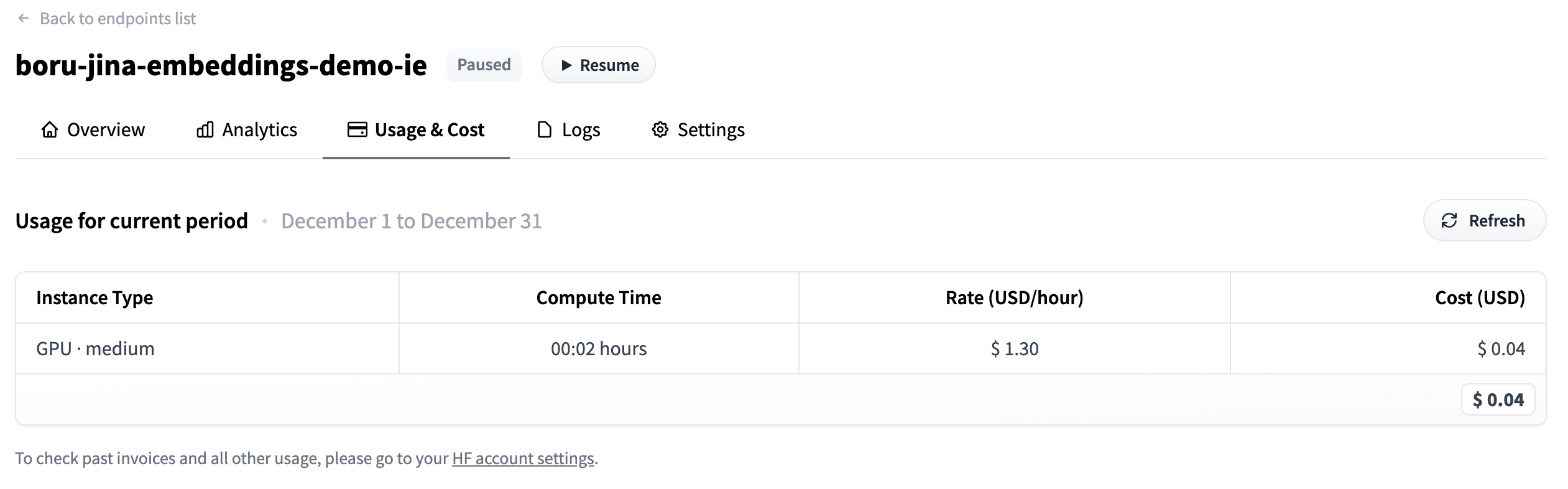
Analyze Usage
- Go to your
dashboard_urlprinted below - Click on the Usage & Cost tab
- See how much you have spent
https://ui.endpoints.huggingface.co/HF-test-lab/endpoints/boru-jina-embeddings-demo-ie
Hit enter to continue with the notebook
''
We can see that it only took $0.04 to pay for this!
Delete Endpoint
Now that we are done, we don't need our endpoint anymore. We can delete our endpoint programmatically.
Endpoint deleted successfully