

Rag With Knowledge Graphs Neo4j
Enhancing RAG Reasoning with Knowledge Graphs
Authored by: Diego Carpintero
Knowledge Graphs provide a method for modeling and storing interlinked information in a format that is both human- and machine-understandable. These graphs consist of nodes and edges, representing entities and their relationships. Unlike traditional databases, the inherent expressiveness of graphs allows for richer semantic understanding, while providing the flexibility to accommodate new entity types and relationships without being constrained by a fixed schema.
By combining knowledge graphs with embeddings (vector search), we can leverage multi-hop connectivity and contextual understanding of information to enhance reasoning and explainability in LLMs.
This notebook explores the practical implementation of this approach, demonstrating how to:
- Build a knowledge graph in Neo4j related to research publications using a synthetic dataset,
- Project a subset of our data fields into a high-dimensional vector space using an embedding model,
- Construct a vector index on those embeddings to enable similarity search, and
- Extract insights from our graph using natural language by easily converting user queries into cypher statements with LangChain:

Initialization
Set up a Neo4j instance
We will create our Knowledge Graph using Neo4j, an open-source database management system that specializes in graph database technology.
For a quick and easy setup, you can start a free instance on Neo4j Aura.
You might then set NEO4J_URI, NEO4J_USERNAME, and NEO4J_PASSWORD as environment variables using a .env file:
True
Langchain provides the Neo4jGraph class to interact with Neo4j:
Loading Dataset into a Graph
The below example creates a connection with our Neo4j database and populates it with synthetic data comprising research articles and their authors.
The entities are:
- Researcher
- Article
- Topic
Whereas the relationships are:
- Researcher --[PUBLISHED]--> Article
- Article --[IN_TOPIC]--> Topic
[]
Let's check that the nodes and relationships have been initialized correctly:
Node properties:
Article {title: STRING, abstract: STRING, publication_date: DATE, embedding: LIST}
Researcher {name: STRING}
Topic {name: STRING}
Relationship properties:

The relationships:
(:Article)-[:IN_TOPIC]->(:Topic)
(:Researcher)-[:PUBLISHED]->(:Article)
Our knowledge graph can be inspected in the Neo4j workspace:

Building a Vector Index
Now we construct a vector index to efficiently search for relevant articles based on their topic, title, and abstract. This process involves calculating the embeddings for each article using these fields. At query time, the system finds the most similar articles to the user's input by employing a similarity metric, such as cosine distance.
Note: To access OpenAI embedding models you will need to create an OpenAI account, get an API key, and set OPENAI_API_KEY as an environment variable. You might also find it useful to experiment with another embedding model integration.
Q&A on Similarity
Langchain RetrievalQA creates a question-answering (QA) chain using the above vector index as a retriever.
Let's ask 'which articles discuss how AI might affect our daily life?':
The articles that discuss how AI might affect our daily life are:

1. **The Impact of AI on Employment: A Comprehensive Study**
   *Abstract:* This study analyzes the potential effects of AI on various job sectors and suggests policy recommendations to mitigate negative impacts.

2. **The Societal Implications of Advanced AI: A Multidisciplinary Analysis**
   *Abstract:* Our study brings together experts from various fields to analyze the potential long-term impacts of advanced AI on society, economy, and culture.

These two articles would provide insights into how AI could potentially impact our daily lives from different perspectives.
Traversing Knowledge Graphs for Inference
Knowledge graphs are excellent for making connections between entities, enabling the extraction of patterns and the discovery of new insights.
This section demonstrates how to implement this process and integrate the results into an LLM pipeline using natural language queries.
Graph-Cypher-Chain w/ LangChain
To construct expressive and efficient queries Neo4j users Cypher, a declarative query language inspired by SQL. LangChain provides the wrapper GraphCypherQAChain, an abstraction layer that allows querying graph databases using natural language, making it easier to integrate graph-based data retrieval into LLM pipelines.
In practice, GraphCypherQAChain:
- generates Cypher statements (queries for graph databases like Neo4j) from user input (natural language) applying in-context learning (prompt engineering),
- executes said statements against a graph database, and
- provides the results as context to ground the LLM responses on accurate, up-to-date information:
Note: This implementation involves executing model-generated graph queries, which carries inherent risks such as unintended access or modification of sensitive data in the database. To mitigate these risks, ensure that your database connection permissions are as restricted as possible to meet the specific needs of your chain/agent. While this approach reduces risk, it does not eliminate it entirely.
Query Samples using Natural Language
Note in the following examples how the results from the cypher query execution are provided as context to the LLM:
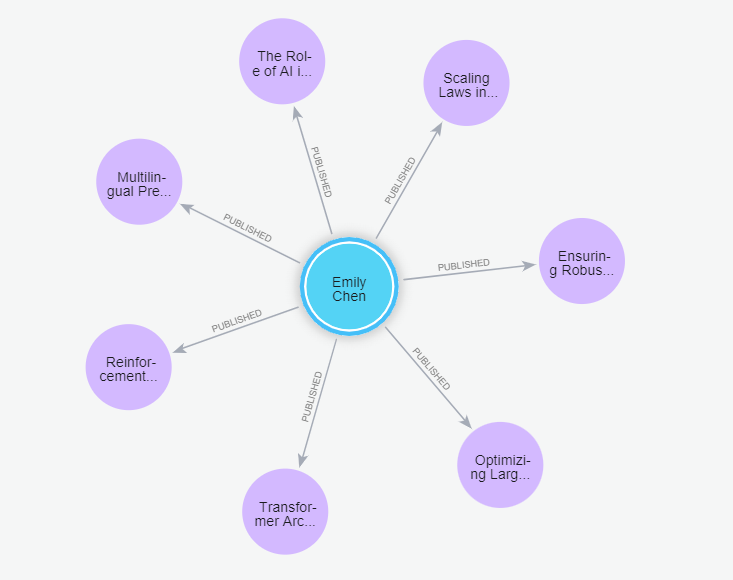
"How many articles has published Emily Chen?"
In this example, our question 'How many articles has published Emily Chen?' will be translated into the Cyper query:
MATCH (r:Researcher {name: "Emily Chen"})-[:PUBLISHED]->(a:Article)
RETURN COUNT(a) AS numberOfArticles
which matches nodes labeled Author with the name 'Emily Chen' and traverses the PUBLISHED relationships to Article nodes.
It then counts the number of Article nodes connected to 'Emily Chen':
> Entering new GraphCypherQAChain chain...
Generated Cypher:
cypher
MATCH (r:Researcher {name: "Emily Chen"})-[:PUBLISHED]->(a:Article)
RETURN COUNT(a) AS numberOfArticles

Full Context:
[{'numberOfArticles': 7}]

> Finished chain.
{'query': 'How many articles has published Emily Chen?',
, 'result': 'Emily Chen has published 7 articles.'} "Are there any pair of researchers who have published more than three articles together?"
In this example, the query 'are there any pair of researchers who have published more than three articles together?' results in the Cypher query:
MATCH (r1:Researcher)-[:PUBLISHED]->(a:Article)<-[:PUBLISHED]-(r2:Researcher)
WHERE r1 <> r2
WITH r1, r2, COUNT(a) AS sharedArticles
WHERE sharedArticles > 3
RETURN r1.name, r2.name, sharedArticles
which results in traversing from the Researcher nodes to the PUBLISHED relationship to find connected Article nodes, and then traversing back to find Researchers pairs.

> Entering new GraphCypherQAChain chain...
Generated Cypher:
cypher
MATCH (r1:Researcher)-[:PUBLISHED]->(a:Article)<-[:PUBLISHED]-(r2:Researcher)
WHERE r1 <> r2
WITH r1, r2, COUNT(a) AS sharedArticles
WHERE sharedArticles > 3
RETURN r1.name, r2.name, sharedArticles

Full Context:
[{'r1.name': 'David Johnson', 'r2.name': 'Emily Chen', 'sharedArticles': 4}, {'r1.name': 'Robert Taylor', 'r2.name': 'Emily Chen', 'sharedArticles': 4}, {'r1.name': 'Emily Chen', 'r2.name': 'David Johnson', 'sharedArticles': 4}, {'r1.name': 'Emily Chen', 'r2.name': 'Robert Taylor', 'sharedArticles': 4}]

> Finished chain.
{'query': 'are there any pair of researchers who have published more than three articles together?',
, 'result': 'Yes, David Johnson and Emily Chen, as well as Robert Taylor and Emily Chen, have published more than three articles together.'} "which researcher has collaborated with the most peers?"
Let's find out who is the researcher with most peers collaborations. Our query 'which researcher has collaborated with the most peers?' results now in the Cyper:
MATCH (r:Researcher)-[:PUBLISHED]->(:Article)<-[:PUBLISHED]-(peer:Researcher)
WITH r, COUNT(DISTINCT peer) AS peerCount
RETURN r.name AS researcher, peerCount
ORDER BY peerCount DESC
LIMIT 1
Here, we need to start from all Researcher nodes and traverse their PUBLISHED relationships to find connected Article nodes. For each Article node, Neo4j then traverses back to find other Researcher nodes (peer) who have also published the same article.

> Entering new GraphCypherQAChain chain...
Generated Cypher:
cypher
MATCH (r1:Researcher)-[:PUBLISHED]->(:Article)<-[:PUBLISHED]-(r2:Researcher)
WHERE r1 <> r2
WITH r1, COUNT(DISTINCT r2) AS collaborators
RETURN r1.name AS researcher, collaborators
ORDER BY collaborators DESC
LIMIT 1

Full Context:
[{'researcher': 'David Johnson', 'collaborators': 6}]

> Finished chain.
{'query': 'Which researcher has collaborated with the most peers?',
, 'result': 'David Johnson has collaborated with 6 peers.'}