

Main
Multimodal Search through Image and Text
Use OpenAI's Clip neural network to embed images and text for vector similarity search
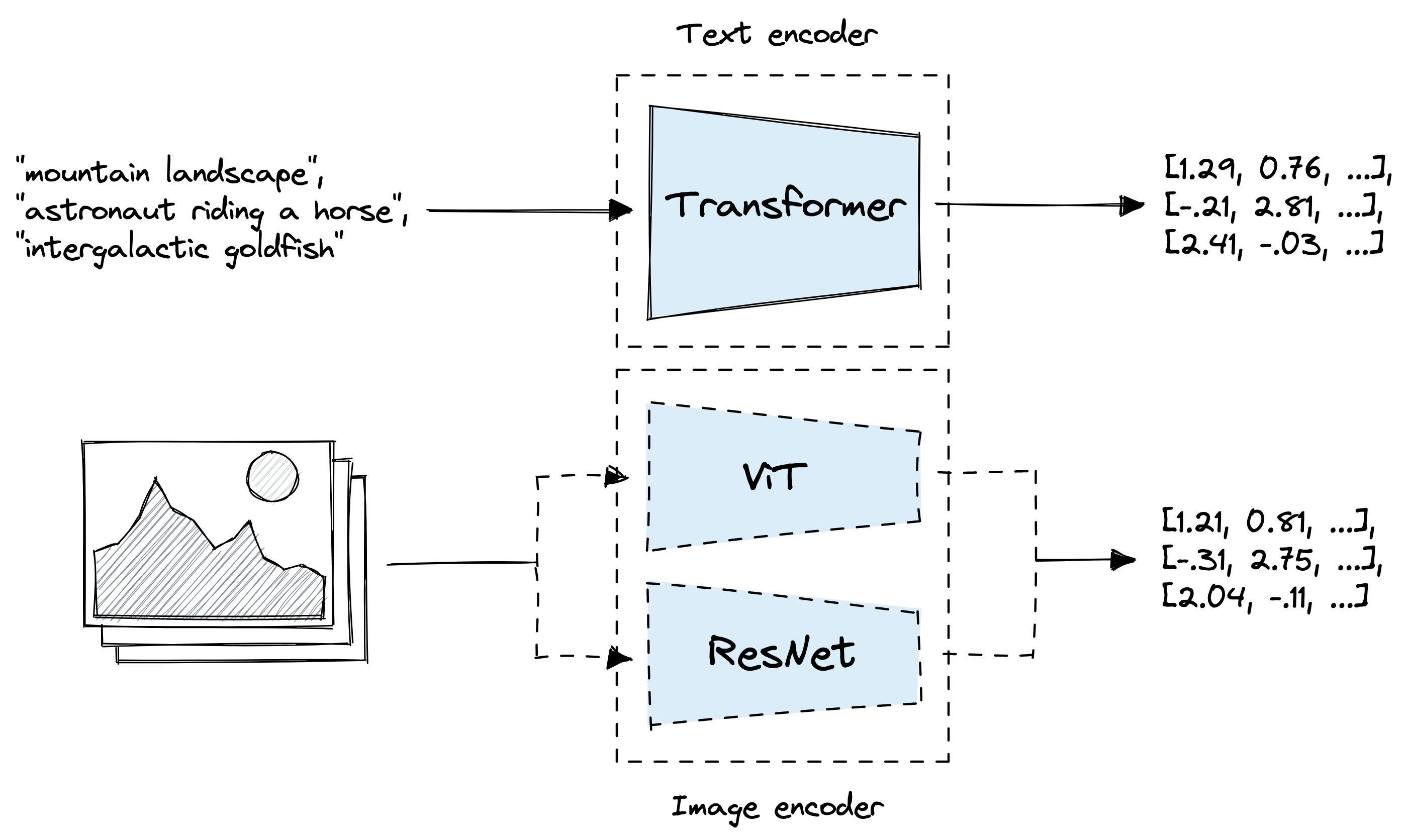
This example is aimed to guide you through using OpenAI's Clip model to embed a dataset, store it into LanceDB, and search for relevant texts/images. The "multimodal_clip" example also uses the same model.
First, let's install and import some dependencies. (These are all in the requirements.txt file in this example folder and the root folder.)
We will be using this HuggingFace dataset here, which contain pictures of various types of dogs and other animals.
Load the dataset
Unfortunately, this dataset only labels the images with numbers, so we can create an enum to map the numbers to the actual class names. The names are provided on the HuggingFace dataset link.
Enum class
{'labels': 0, 'img': <PIL.JpegImagePlugin.JpegImageFile image mode=RGB size=500x339 at 0x7BF5108F85B0>, 'is_generated': False}
italian_greyhound
We can now load the pretrained model ViT-B/32 from Clip, using either cuda or cpu depending on which torch version you are using.
Creating the image embedding function here. We want the embeddings to be a standard list, so we can convert the Tensor array to Numpy array to List.
512
Time to connect to the LanceDB table! you can create a PyArrow schema to initialize an empty table, like this:
schema = pa.schema(
[
pa.field("vector", pa.list_(pa.float32(), 512)),
pa.field("id", pa.int32()),
pa.field("label", pa.int32()),
])
tbl = db.create_table("animal_images", schema=schema)
After creating the table, we want to prepare all the data to add to the table. We can first append all the data as a dictionary to an array.
100%|██████████| 3704/3704 [01:22<00:00, 44.96it/s]
Then, we can split it up into batches of 50, to then embed the image and add to the table. This will take around 10 minutes, because embedding 3.7k images can take a while.
The table looks good! We can now start testing the image search. First, load the validation split of the dataset.
1439
{'labels': 1, 'img': <PIL.JpegImagePlugin.JpegImageFile image mode=RGB size=500x375 at 0x7BF512CB8A30>, 'is_generated': False}
coyote

This is how we can search the table: by embedding the image we want, calling the search function, and retuning a Pandas DataFrame.
The purpose of storing the ID is to call the original dataset back and displaying the image. Another way could be to store the image as bytes in the database, but this would make the database much larger.
And getting the id of the first result:
hyena
1532

Nice! It correctly identified another italian greyhound! Now, to everything into a function:
tiger_cat

vector id label _distance 0 [-0.049102783, -0.21655273, -0.12780762, -0.07... 3132 12 23.221460 1 [0.2241211, -0.2836914, -0.18920898, -0.073059... 3315 12 23.790337 2 [-0.12030029, -0.2290039, -0.15270996, -0.3728... 3163 12 24.347380 3 [-0.042541504, -0.36791992, -0.17285156, -0.22... 3174 12 25.933134 4 [0.1373291, -0.22399902, -0.06616211, -0.07781... 2987 12 26.332230 tiger_cat

tiger_cat

tiger_cat

tiger_cat

tiger_cat

Great, we have finished the image search! To begin the multimodal text search, we can create a similar embedding function, but using Clip's encode_text function instead of encode_image.
512
We perform the same search here by calling our just-made text embedder.
irish_terrier

Combining everything into a function once again:
vector id label _distance 0 [-0.6616211, 0.1842041, -0.15319824, 0.2392578... 3532 13 119.904297 1 [-0.19128418, -0.4519043, -0.05456543, 0.12890... 3581 14 120.694580 2 [-0.06365967, -0.34350586, -0.095214844, 0.590... 3434 13 124.063377 3 [0.009864807, 0.037109375, -0.14575195, -0.042... 981 3 130.515411 4 [-0.18713379, 0.18688965, -0.2310791, 0.409179... 3487 13 131.742676 white_wolf

timber_wolf

white_wolf

rottweiler

white_wolf

Great! It's working pretty well, except for the 4th image, which probably included the background into the embedding. But for now, it's good enough. You can always play around with this notebook and try to improve the results, but I hope you learned how to use multimodal search with OpenAI's Clip model!