

Js Integration Vercel Ai Sdk
Observability and Tracing for the Vercel AI SDK
This notebook demonstrates how to integrate Langfuse with the Vercel AI SDK to monitor, debug, and evaluate your LLM-powered applications and AI agents.
What is the Vercel AI SDK?: The Vercel AI SDK is a lightweight toolkit that lets developers call and stream responses from AI models (like OpenAI, Anthropic, or any compliant provider) directly in web apps with simple server/client functions.
What is Langfuse?: Langfuse is an open-source observability platform for AI agents and LLM applications. It helps you visualize and monitor LLM calls, tool usage, cost, latency, and more.
How do they work together? The Vercel AI SDK has built-in telemetry based on OpenTelemetry. Langfuse also uses OpenTelemetry, which means they integrate seamlessly. When you enable telemetry in the Vercel AI SDK and add the Langfuse span processor, your AI calls automatically flow into Langfuse where you can analyze them.
Steps to integrate Langfuse with the Vercel AI SDK
TL;DR
Here's the flow of how Langfuse and the Vercel AI SDK work together:
- You enable telemetry in the AI SDK (
experimental_telemetry: { isEnabled: true }) - The AI SDK creates spans for each operation (model calls, tool executions, etc.)
- The LangfuseSpanProcessor intercepts these spans and sends them to Langfuse
- Langfuse stores and visualizes the data in traces you can explore
This integration uses OpenTelemetry, an observability standard. The Vercel AI SDK's telemetry feature is documented in the Vercel AI SDK documentation on Telemetry.
Let's walk through the steps in more detail.
1. Install Dependencies
Install the Vercel AI SDK, OpenTelemetry, and Langfuse:
npm install ai
npm install @ai-sdk/openai
npm install @langfuse/tracing @langfuse/otel @opentelemetry/sdk-node
2. Configure Environment & API Keys
Set up your Langfuse and LLM provider credentials (this example uses OpenAI). You can get Langfuse keys by signing up for a free Langfuse Cloud account or by self-hosting Langfuse.
LANGFUSE_SECRET_KEY = "sk-lf-..."
LANGFUSE_PUBLIC_KEY = "pk-lf-..."
LANGFUSE_BASE_URL = "https://cloud.langfuse.com" # 🇪🇺 EU region
# LANGFUSE_BASE_URL = "https://us.cloud.langfuse.com" # 🇺🇸 US region

OPENAI_API_KEY = "sk-proj-"
3. Initialize Langfuse with OpenTelemetry
Langfuse's tracing is built on OpenTelemetry. To connect Langfuse with the Vercel AI SDK, you need to set up the OpenTelemetry SDK with the LangfuseSpanProcessor.
The LangfuseSpanProcessor is the component that captures telemetry data (called "spans" in OpenTelemetry) and sends it to Langfuse for storage and visualization.
4. Enable telemetry in your AI SDK calls
Simply pass { experimental_telemetry: { isEnabled: true }} to your AI SDK functions. The AI SDK will automatically create telemetry spans, which the LangfuseSpanProcessor (from step 3) captures and sends to Langfuse.
That's it! This works for all AI SDK functions including generateText, streamText, generateObject, and tool calls.
5. See traces in Langfuse
After running the workflow, you can view the complete trace in Langfuse:
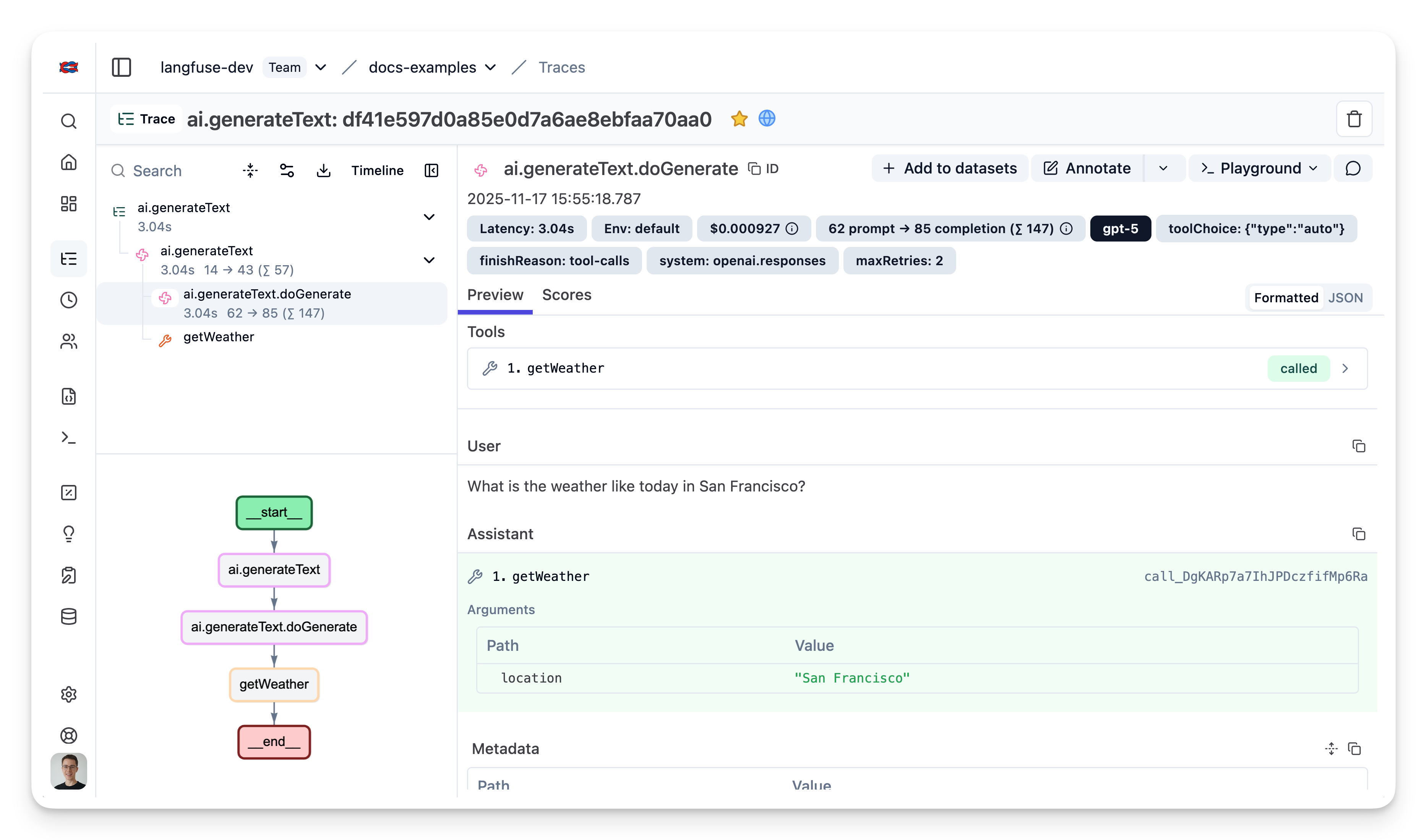
Example Trace: View in Langfuse
Combining with Prompt Management
If you're using Langfuse Prompt Management to version and manage your prompts, it's recommended to link your prompts to traces. This allows you to see which prompt version was used for each generation, in a trace.
To link a prompt to a trace, pass the prompt metadata in the experimental_telemetry field:
import { generateText } from "ai";
import { openai } from "@ai-sdk/openai";
import { LangfuseClient } from "@langfuse/client"; // Add this import

const langfuse = new LangfuseClient();

// Get current `production` version
const prompt = await langfuse.prompt.get("movie-critic");

// Insert variables into prompt template
const compiledPrompt = prompt.compile({
  someVariable: "example-variable",
});

const { text } = await generateText({
  model: openai("gpt-5"),
  prompt: compiledPrompt,
  experimental_telemetry: {
    isEnabled: true,
    metadata: {
      langfusePrompt: prompt.toJSON() // This links the Generation to your prompt in Langfuse
    },
  },
});
Once linked, you'll see the prompt version displayed in the trace details in Langfuse.
Setup with Next.js
For production Next.js applications, you'll need a few additional configurations to handle streaming responses properly and ensure traces are sent before serverless functions terminate.
This example shows how to:
- Set up OpenTelemetry instrumentation in Next.js (using the
instrumentation.tsfile) - Handle streaming responses with proper span lifecycle
- Add session and user tracking to traces
- Ensure traces are flushed in serverless environments
Setup instrumentation
Create a new file instrumentation.ts in your project root. This file runs when your Next.js app starts up, initializing the OpenTelemetry setup:
Create API route with streaming
The example below shows a chat endpoint that uses the Langfuse observe() wrapper to create a trace, adds session and user metadata, and properly handles streaming responses. Concretely:
observe()creates a Langfuse trace around your handlerpropagateAttributes()adds session and user metadata for better trace organizationforceFlush()ensures traces are sent before the serverless function terminatesendOnExit: falsekeeps the observation open until the streaming response completes
Usage together with other observability tools
The Vercel AI SDK uses OpenTelemetry for tracing (instrumentation scope: ai). If you're also using Sentry, Datadog, or other OTEL-based tools, you may need additional configuration to avoid conflicts. See Using Langfuse with an Existing OpenTelemetry Setup.