

Structured Text Extraction From Images
Extracting Structured Data from Images

Introduction
In this notebook we will demonstrate how you can use a language vision model(Llama 3.2 90B Vision) along with an LLM that has JSON mode enabled(Llama 3.1 70B) to extract structured text from images.
In our case we will extract line items from an invoice in the form of a JSON.

Install relevant libraries
Collecting together
  Downloading together-1.3.3-py3-none-any.whl.metadata (11 kB)
Requirement already satisfied: aiohttp<4.0.0,>=3.9.3 in /usr/local/lib/python3.10/dist-packages (from together) (3.10.10)
Requirement already satisfied: click<9.0.0,>=8.1.7 in /usr/local/lib/python3.10/dist-packages (from together) (8.1.7)
Requirement already satisfied: eval-type-backport<0.3.0,>=0.1.3 in /usr/local/lib/python3.10/dist-packages (from together) (0.2.0)
Requirement already satisfied: filelock<4.0.0,>=3.13.1 in /usr/local/lib/python3.10/dist-packages (from together) (3.16.1)
Requirement already satisfied: numpy>=1.23.5 in /usr/local/lib/python3.10/dist-packages (from together) (1.26.4)
Requirement already satisfied: pillow<11.0.0,>=10.3.0 in /usr/local/lib/python3.10/dist-packages (from together) (10.4.0)
Requirement already satisfied: pyarrow>=10.0.1 in /usr/local/lib/python3.10/dist-packages (from together) (16.1.0)
Requirement already satisfied: pydantic<3.0.0,>=2.6.3 in /usr/local/lib/python3.10/dist-packages (from together) (2.9.2)
Requirement already satisfied: requests<3.0.0,>=2.31.0 in /usr/local/lib/python3.10/dist-packages (from together) (2.32.3)
Requirement already satisfied: rich<14.0.0,>=13.8.1 in /usr/local/lib/python3.10/dist-packages (from together) (13.9.2)
Requirement already satisfied: tabulate<0.10.0,>=0.9.0 in /usr/local/lib/python3.10/dist-packages (from together) (0.9.0)
Requirement already satisfied: tqdm<5.0.0,>=4.66.2 in /usr/local/lib/python3.10/dist-packages (from together) (4.66.5)
Requirement already satisfied: typer<0.13,>=0.9 in /usr/local/lib/python3.10/dist-packages (from together) (0.12.5)
Requirement already satisfied: aiohappyeyeballs>=2.3.0 in /usr/local/lib/python3.10/dist-packages (from aiohttp<4.0.0,>=3.9.3->together) (2.4.3)
Requirement already satisfied: aiosignal>=1.1.2 in /usr/local/lib/python3.10/dist-packages (from aiohttp<4.0.0,>=3.9.3->together) (1.3.1)
Requirement already satisfied: attrs>=17.3.0 in /usr/local/lib/python3.10/dist-packages (from aiohttp<4.0.0,>=3.9.3->together) (24.2.0)
Requirement already satisfied: frozenlist>=1.1.1 in /usr/local/lib/python3.10/dist-packages (from aiohttp<4.0.0,>=3.9.3->together) (1.4.1)
Requirement already satisfied: multidict<7.0,>=4.5 in /usr/local/lib/python3.10/dist-packages (from aiohttp<4.0.0,>=3.9.3->together) (6.1.0)
Requirement already satisfied: yarl<2.0,>=1.12.0 in /usr/local/lib/python3.10/dist-packages (from aiohttp<4.0.0,>=3.9.3->together) (1.15.2)
Requirement already satisfied: async-timeout<5.0,>=4.0 in /usr/local/lib/python3.10/dist-packages (from aiohttp<4.0.0,>=3.9.3->together) (4.0.3)
Requirement already satisfied: annotated-types>=0.6.0 in /usr/local/lib/python3.10/dist-packages (from pydantic<3.0.0,>=2.6.3->together) (0.7.0)
Requirement already satisfied: pydantic-core==2.23.4 in /usr/local/lib/python3.10/dist-packages (from pydantic<3.0.0,>=2.6.3->together) (2.23.4)
Requirement already satisfied: typing-extensions>=4.6.1 in /usr/local/lib/python3.10/dist-packages (from pydantic<3.0.0,>=2.6.3->together) (4.12.2)
Requirement already satisfied: charset-normalizer<4,>=2 in /usr/local/lib/python3.10/dist-packages (from requests<3.0.0,>=2.31.0->together) (3.4.0)
Requirement already satisfied: idna<4,>=2.5 in /usr/local/lib/python3.10/dist-packages (from requests<3.0.0,>=2.31.0->together) (3.10)
Requirement already satisfied: urllib3<3,>=1.21.1 in /usr/local/lib/python3.10/dist-packages (from requests<3.0.0,>=2.31.0->together) (2.2.3)
Requirement already satisfied: certifi>=2017.4.17 in /usr/local/lib/python3.10/dist-packages (from requests<3.0.0,>=2.31.0->together) (2024.8.30)
Requirement already satisfied: markdown-it-py>=2.2.0 in /usr/local/lib/python3.10/dist-packages (from rich<14.0.0,>=13.8.1->together) (3.0.0)
Requirement already satisfied: pygments<3.0.0,>=2.13.0 in /usr/local/lib/python3.10/dist-packages (from rich<14.0.0,>=13.8.1->together) (2.18.0)
Requirement already satisfied: shellingham>=1.3.0 in /usr/local/lib/python3.10/dist-packages (from typer<0.13,>=0.9->together) (1.5.4)
Requirement already satisfied: mdurl~=0.1 in /usr/local/lib/python3.10/dist-packages (from markdown-it-py>=2.2.0->rich<14.0.0,>=13.8.1->together) (0.1.2)
Requirement already satisfied: propcache>=0.2.0 in /usr/local/lib/python3.10/dist-packages (from yarl<2.0,>=1.12.0->aiohttp<4.0.0,>=3.9.3->together) (0.2.0)
Downloading together-1.3.3-py3-none-any.whl (68 kB)
   ━━━━━━━━━━━━━━━━━━━━━━━━━━━━━━━━━━━━━━━━ 68.1/68.1 kB 1.9 MB/s eta 0:00:00
Installing collected packages: together
Successfully installed together-1.3.3
Create Invoice Structure using Pydantic
We need a way of telling the LLM what structure to organize information into - including what information to expect in the receipt. We will do this using pydantic models.
Below we define the required classes.
- Each line item on the receipt will have a
name,priceandquantity. TheItemclass specifies this. - Each receipt/invoice is a combination of multiple line
Itemelements along with atotalprice. TheReceiptclass specifies this.
Lets bring in the receipt that we want to extract information from
Notice that this is a real receipt with multiple portions that are not relevant to the line item extraction structure we've outlined above.
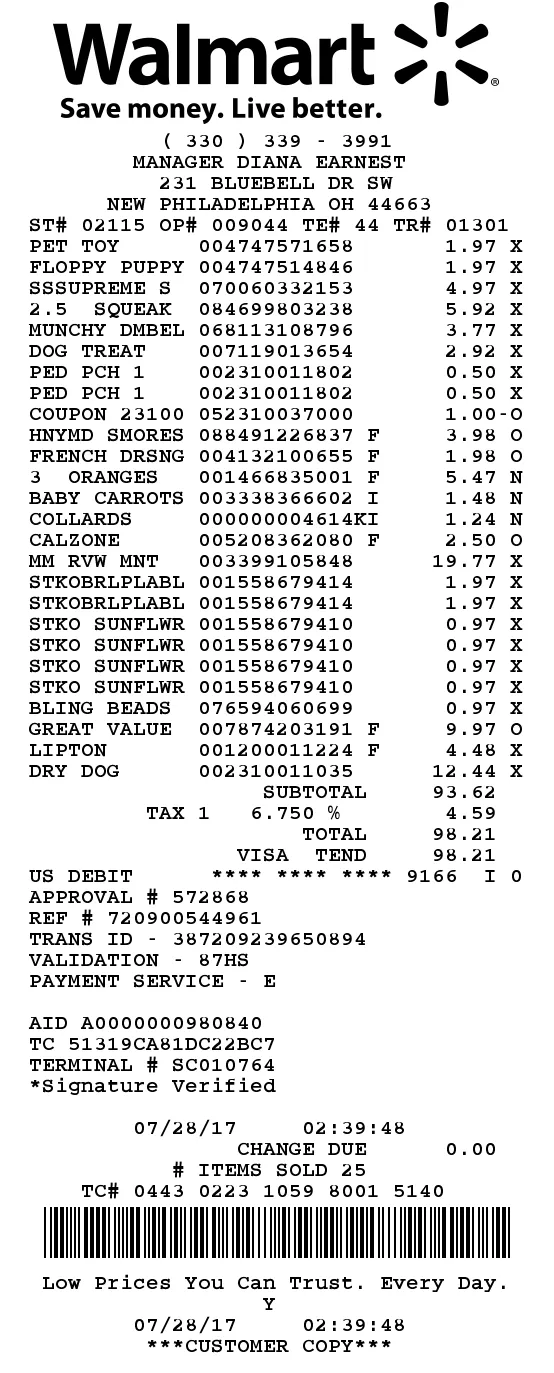
1. Extract Information Receipt
We will use the Llama 3.2 90B Vision model to extract out information in normal text format.
The receipt shows a total of 17 line items. The details for each item are as follows:

1. Pet Toy: $1.97, quantity - 1
2. Floppy Puppy: $1.97, quantity - 1
3. Sssupreme S: $4.97, quantity - 1
4. 2.5 Squeak: $5.92, quantity - 1
5. Munchy Dmbel: $3.77, quantity - 1
6. Dog Treat: $2.92, quantity - 1
7. Ped Pch 1: $0.50, quantity - 1 (x2)
8. Coupon: $1.00, quantity - 1
9. Hnymd Smores: $3.98, quantity - 1
10. French Drsng: $1.98, quantity - 1
11. 3 Oranges: $5.47, quantity - 1
12. Baby Carrots: $1.48, quantity - 1
13. Collards: $1.24, quantity - 1
14. Calzone: $2.50, quantity - 1
15. Mm Rvw Mnt: $19.77, quantity - 1
16. Stkobrlplabl: $1.97, quantity - 1 (x6)
17. Dry Dog: $12.44, quantity - 1

The total is $98.21.
Notice that the model is not perfect and wasn't able to extract out some line items. It's hard for most models to perform this zero-shot extraction of data from images. A way to improve this is to finetune the model using Visual Instruction Tuning.
2. Organize Information as JSON
We will use Llama 3.1 70B with structured generation in JSON mode to organize the information extracted by the vision model into an acceptable JSON format that can be parsed.
Meta-Llama-3.1-70B-Instruct-Turbo will strcitly respect the JSON schema passed to it.
{
  "items": [
    {
      "name": "Pet Toy",
      "price": 1.97,
      "quantity": 1
    },
    {
      "name": "Floppy Puppy",
      "price": 1.97,
      "quantity": 1
    },
    {
      "name": "Sssupreme S",
      "price": 4.97,
      "quantity": 1
    },
    {
      "name": "2.5 Squeak",
      "price": 5.92,
      "quantity": 1
    },
    {
      "name": "Munchy Dmbel",
      "price": 3.77,
      "quantity": 1
    },
    {
      "name": "Dog Treat",
      "price": 2.92,
      "quantity": 1
    },
    {
      "name": "Ped Pch 1",
      "price": 0.5,
      "quantity": 2
    },
    {
      "name": "Coupon",
      "price": -1.0,
      "quantity": 1
    },
    {
      "name": "Hnymd Smores",
      "price": 3.98,
      "quantity": 1
    },
    {
      "name": "French Drsng",
      "price": 1.98,
      "quantity": 1
    },
    {
      "name": "3 Oranges",
      "price": 5.47,
      "quantity": 1
    },
    {
      "name": "Baby Carrots",
      "price": 1.48,
      "quantity": 1
    },
    {
      "name": "Collards",
      "price": 1.24,
      "quantity": 1
    },
    {
      "name": "Calzone",
      "price": 2.5,
      "quantity": 1
    },
    {
      "name": "Mm Rvw Mnt",
      "price": 19.77,
      "quantity": 1
    },
    {
      "name": "Stkobrlplabl",
      "price": 1.97,
      "quantity": 6
    },
    {
      "name": "Dry Dog",
      "price": 12.44,
      "quantity": 1
    }
  ],
  "total": 98.21
}
Although with some missed line items we were able to extract out structured JSON from an image in a zero shot manner! To improve the results for your pipeline and make them production ready I recommend you finetune the vision model on your own dataset!
Learn more about how to use JSON mode in the docs here!