

ObjectDetection
Object Detection
This is a notebooks from AI for Beginners Curriculum
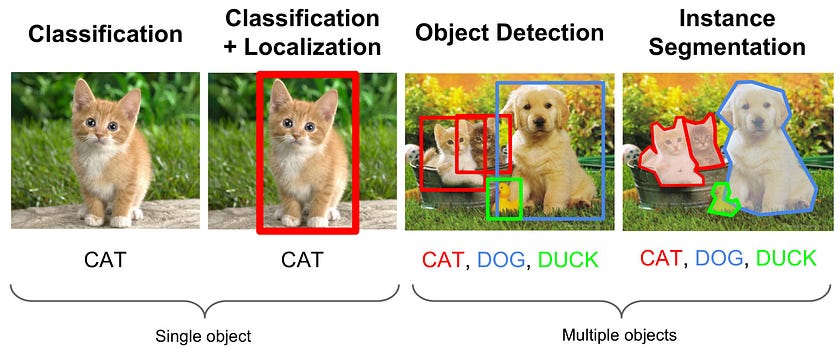
Naive Approach to Object Detection
- Break image into tiles
- Run CNN image classified through each time
- Select tiles with activation above the threshold
Let's read sample image to play with and pad it to square dimension:
<matplotlib.image.AxesImage at 0x1cb8a16e8e0>

We will use pre-trained VGG-16 CNN:
Let's define a function that will predict the probability of a cat on the image. Since ImageNet contains a number of classes for cats, indexed from 281 to 294, we will just add probabilities for those classes to get overall 'cat' probability:
0.61825
Next function will build a heatmap of probabilities, dividing the image into squares:
<matplotlib.image.AxesImage at 0x1cb8983a940>

Detecting Simple Objects
To give more precise location of a bounding box, we need to run regression model to predict bounding box coordinates. Let's start with simple example of having black rectangles in 32x32 images, which we want to detect. The idea and some code are borrowed from this blog post.
The following function will generate a bunch of sample images:
Images shape = (100000, 8, 8)
BBoxes shape = (100000, 4)
To make outputs of the network in the range [0;1], we will divide bboxes by the image size:
array([0. , 0.25 , 0.125, 0.25 ])
In our simple example, we will use dense neural network. In real life, when objects have more complex shape, it definitely makes sense to use CNNs for the task like this. We will use stochastic gradient descent optimizer and mean squared error (MSE) as the metrics, because our task is regression.
Model: "sequential_25"
_________________________________________________________________
 Layer (type)                Output Shape              Param #
=================================================================
 flatten_24 (Flatten)        (None, 64)                0

 dense_50 (Dense)            (None, 200)               13000

 dropout_3 (Dropout)         (None, 200)               0

 dense_51 (Dense)            (None, 4)                 804

=================================================================
Total params: 13,804
Trainable params: 13,804
Non-trainable params: 0
_________________________________________________________________
Let's train our network. We will also normalize the input data (by subtracting mean and dividing by standard deviation) for slightly better performance.
Epoch 1/30
3125/3125 [==============================] - 6s 2ms/step - loss: 0.0562
Epoch 2/30
3125/3125 [==============================] - 5s 2ms/step - loss: 0.0131
Epoch 3/30
3125/3125 [==============================] - 5s 1ms/step - loss: 0.0076
Epoch 4/30
3125/3125 [==============================] - 5s 2ms/step - loss: 0.0058
Epoch 5/30
3125/3125 [==============================] - 5s 2ms/step - loss: 0.0050
Epoch 6/30
3125/3125 [==============================] - 5s 2ms/step - loss: 0.0044
Epoch 7/30
3125/3125 [==============================] - 5s 2ms/step - loss: 0.0041
Epoch 8/30
3125/3125 [==============================] - 5s 2ms/step - loss: 0.0038
Epoch 9/30
3125/3125 [==============================] - 5s 2ms/step - loss: 0.0036
Epoch 10/30
3125/3125 [==============================] - 6s 2ms/step - loss: 0.0034
Epoch 11/30
3125/3125 [==============================] - 8s 3ms/step - loss: 0.0033
Epoch 12/30
3125/3125 [==============================] - 8s 3ms/step - loss: 0.0031
Epoch 13/30
3125/3125 [==============================] - 6s 2ms/step - loss: 0.0030
Epoch 14/30
3125/3125 [==============================] - 6s 2ms/step - loss: 0.0029
Epoch 15/30
3125/3125 [==============================] - 5s 2ms/step - loss: 0.0028
Epoch 16/30
3125/3125 [==============================] - 5s 2ms/step - loss: 0.0028
Epoch 17/30
3125/3125 [==============================] - 5s 2ms/step - loss: 0.0027
Epoch 18/30
3125/3125 [==============================] - 5s 2ms/step - loss: 0.0026
Epoch 19/30
3125/3125 [==============================] - 5s 2ms/step - loss: 0.0026
Epoch 20/30
3125/3125 [==============================] - 5s 2ms/step - loss: 0.0025
Epoch 21/30
3125/3125 [==============================] - 6s 2ms/step - loss: 0.0024
Epoch 22/30
3125/3125 [==============================] - 6s 2ms/step - loss: 0.0024
Epoch 23/30
3125/3125 [==============================] - 6s 2ms/step - loss: 0.0024
Epoch 24/30
3125/3125 [==============================] - 6s 2ms/step - loss: 0.0023
Epoch 25/30
3125/3125 [==============================] - 5s 2ms/step - loss: 0.0023
Epoch 26/30
3125/3125 [==============================] - 5s 2ms/step - loss: 0.0022
Epoch 27/30
3125/3125 [==============================] - 5s 2ms/step - loss: 0.0022
Epoch 28/30
3125/3125 [==============================] - 5s 2ms/step - loss: 0.0022
Epoch 29/30
3125/3125 [==============================] - 5s 2ms/step - loss: 0.0021
Epoch 30/30
3125/3125 [==============================] - 5s 2ms/step - loss: 0.0021
<keras.callbacks.History at 0x1cbb7c499a0>
We seem to have relatively good loss, let's see how it translates into more tangible metrics, such as mAP. First, let's define IOU metric between two bounding boxes:
We will now generate 500 test images, and plot first 5 of them to visualize how accurate we are. We will print out IOU metric as well.
pred=[3.7325673 3.6551285 2.0126944 1.030895 ],act=[4. 4. 2. 1.], IOU=0.41607480412565545
pred=[2.3762555 3.755858  1.1647941 1.0540264],act=[2. 4. 1. 1.], IOU=0.2932611042051458
pred=[-0.04900682 -0.10628867  2.7881489   1.027148  ],act=[0. 0. 3. 1.], IOU=0.7548650953478908
pred=[0.96806276 4.267275   1.3179774  1.1021365 ],act=[0. 5. 1. 1.], IOU=0.004833667961256898
pred=[2.157959   0.94667876 2.7568097  0.96259   ],act=[2. 1. 3. 1.], IOU=0.7965311752734529

Now to calculate mean precision over all cases, we just need to go over all our test samples, compute IoU, and calculate mean:
0.7150587956049862
Real-Life Object Detection
Real object detection algorithms are more complicated. We will recommend you to follow Keras tutorial on Object Detection with RetinaNet if you want to get into the details of RetinaNet implementation, or use Keras RetinaNet Library, if you just want to train object detection model.