

Multimodal Rag With Milvus


Multimodal RAG with Milvus 🖼️
If you want to experience the final effect of this tutorial, you can go directly to online demo
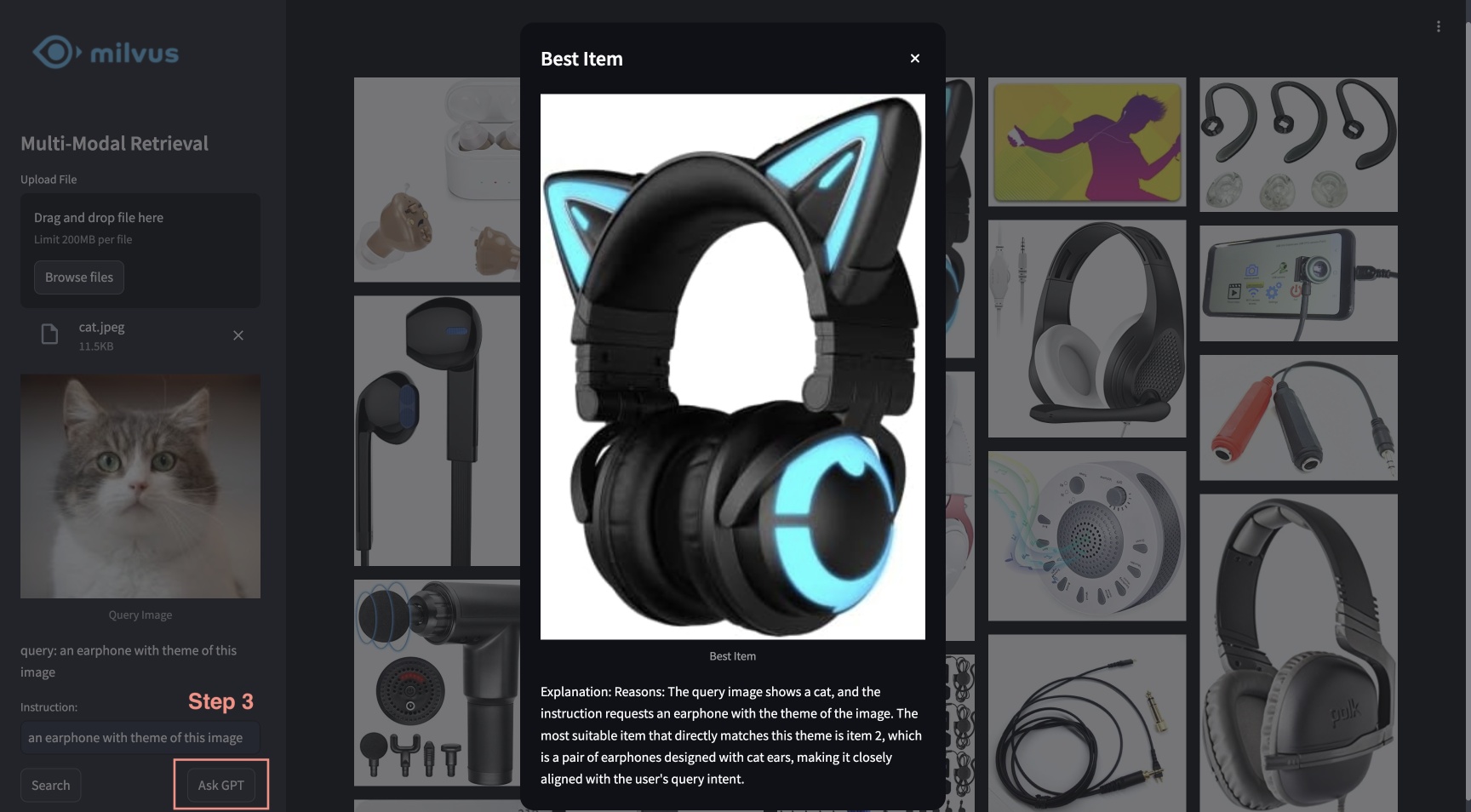
This tutorial showcases the multimodal RAG powered by Milvus, Visualized BGE model, and GPT-4o. With this system, users are able to upload an image and edit text instructions, which are processed by BGE's composed retrieval model to search for candidate images. GPT-4o then acts as a reranker, selecting the most suitable image and providing the rationale behind the choice. This powerful combination enables a seamless and intuitive image search experience, leveraging Milvus for efficient retrieval, BGE model for precise image processing and matching, and GPT-4o for advanced reranking.

Preparation
Install Dependencies
If you are using Google Colab, to enable dependencies just installed, you may need to restart the runtime (click on the "Runtime" menu at the top of the screen, and select "Restart session" from the dropdown menu).
Download Data
The following command will download the example data and extract to a local folder "./images_folder" including:
- images: A subset of Amazon Reviews 2023 as containing approximately 900 images from the categories "Appliance", "Cell_Phones_and_Accessories", and "Electronics".
- leopard.jpg: An example query image.
Load Embedding Model
We will use the Visualized BGE model "bge-visualized-base-en-v1.5" to generate embeddings for both images and text.
1. Download weight
2. Build encoder
Load Data
This section will load example images into the database with corresponding embeddings.
Generate embeddings
Load all jpeg images from the data directory and apply the encoder to convert images to embeddings.
Generating image embeddings: 100%|██████████| 900/900 [00:20<00:00, 44.08it/s]
Number of encoded images: 900
Insert into Milvus
Insert images with corresponding paths and embeddings into Milvus collection.
As for the argument of
MilvusClient:
- Setting the
urias a local file, e.g../milvus_demo.db, is the most convenient method, as it automatically utilizes Milvus Lite to store all data in this file.- If you have large scale of data, you can set up a more performant Milvus server on docker or kubernetes. In this setup, please use the server uri, e.g.
http://localhost:19530, as youruri.- If you want to use Zilliz Cloud, the fully managed cloud service for Milvus, adjust the
uriandtoken, which correspond to the Public Endpoint and Api key in Zilliz Cloud.
DEBUG:pymilvus.milvus_client.milvus_client:Created new connection using: 7f33daeed99a4d8e8a5e28d47673ecc8
DEBUG:pymilvus.milvus_client.milvus_client:Successfully created collection: multimodal_rag_demo
DEBUG:pymilvus.milvus_client.milvus_client:Successfully created an index on collection: multimodal_rag_demo
{'insert_count': 900,
, 'ids': [451537887696781312, 451537887696781313, ..., 451537887696782211],
, 'cost': 0}
Multimodal Search with Generative Reranker
In this section, we will firstly search for relevant images by a multimodal query and then use LLM service to rerank the results and find the best one with explanation.
Run search
Now we are ready to perform the advanced image search with query data composed of both image and text instruction.
['./images_folder/images/518Gj1WQ-RL._AC_.jpg', './images_folder/images/41n00AOfWhL._AC_.jpg', './images_folder/images/51Wqge9HySL._AC_.jpg', './images_folder/images/51R2SZiywnL._AC_.jpg', './images_folder/images/516PebbMAcL._AC_.jpg', './images_folder/images/51RrgfYKUfL._AC_.jpg', './images_folder/images/515DzQVKKwL._AC_.jpg', './images_folder/images/51BsgVw6RhL._AC_.jpg', './images_folder/images/51INtcXu9FL._AC_.jpg']
Rerank with GPT-4o
We will use an LLM to rank images and generate an explanation for the best result based on the user query and retrieved results.
1. Create a panoramic view
Combine the query image and retrieved images with indices in a panoramic view.

2. Rerank and explain
We will send the combined image to multimodal LLM service together with proper prompts to rank the retrieved results with explanation. To enable GPT-4o as the LLM, you need to prepare your OpenAI API Key.
Get the image indices after ranking and the reason for the best result:
3. Display the best result with explanation
Reasons: The most suitable item for the user's query intent is index 6 because the instruction specifies a phone case with the theme of the image, which is a leopard. The phone case with index 6 has a thematic design resembling the leopard pattern, making it the closest match to the user's request for a phone case with the image theme.

Quick Deploy
To learn about how to start an online demo with this tutorial, please refer to the example application.