

Cookbook Maxim Mistral Integration
mistral-cookbookthird_partyMaxim
Export

Observability with Mistral AI and Maxim
In this cookbook, we show you how to use Maxim, to observe Mistral LLM calls & metrics.
What is Maxim?
Maxim AI provides comprehensive observability for your Mistral based AI applications. With Maxim's one-line integration, you can easily trace and analyse LLM calls, metrics, and more.
Pros:
- Performance Analytics: Track latency, tokens consumed, and costs
- Advanced Visualisation: Understand agent trajectories through intuitive dashboards
Install and Import Required Modules
You need to install mistralai and maxim-py packages from pypy
[ ]
Collecting mistralai
  Downloading mistralai-1.8.1-py3-none-any.whl.metadata (33 kB)
Collecting maxim-py
  Downloading maxim_py-3.8.1-py3-none-any.whl.metadata (13 kB)
Collecting eval-type-backport>=0.2.0 (from mistralai)
  Downloading eval_type_backport-0.2.2-py3-none-any.whl.metadata (2.2 kB)
Requirement already satisfied: httpx>=0.28.1 in /usr/local/lib/python3.11/dist-packages (from mistralai) (0.28.1)
Requirement already satisfied: pydantic>=2.10.3 in /usr/local/lib/python3.11/dist-packages (from mistralai) (2.11.5)
Requirement already satisfied: python-dateutil>=2.8.2 in /usr/local/lib/python3.11/dist-packages (from mistralai) (2.9.0.post0)
Requirement already satisfied: typing-inspection>=0.4.0 in /usr/local/lib/python3.11/dist-packages (from mistralai) (0.4.1)
Requirement already satisfied: requests in /usr/local/lib/python3.11/dist-packages (from maxim-py) (2.32.3)
Requirement already satisfied: urllib3 in /usr/local/lib/python3.11/dist-packages (from maxim-py) (2.4.0)
Requirement already satisfied: typing-extensions in /usr/local/lib/python3.11/dist-packages (from maxim-py) (4.13.2)
Collecting filetype (from maxim-py)
  Downloading filetype-1.2.0-py2.py3-none-any.whl.metadata (6.5 kB)
Requirement already satisfied: anyio in /usr/local/lib/python3.11/dist-packages (from httpx>=0.28.1->mistralai) (4.9.0)
Requirement already satisfied: certifi in /usr/local/lib/python3.11/dist-packages (from httpx>=0.28.1->mistralai) (2025.4.26)
Requirement already satisfied: httpcore==1.* in /usr/local/lib/python3.11/dist-packages (from httpx>=0.28.1->mistralai) (1.0.9)
Requirement already satisfied: idna in /usr/local/lib/python3.11/dist-packages (from httpx>=0.28.1->mistralai) (3.10)
Requirement already satisfied: h11>=0.16 in /usr/local/lib/python3.11/dist-packages (from httpcore==1.*->httpx>=0.28.1->mistralai) (0.16.0)
Requirement already satisfied: annotated-types>=0.6.0 in /usr/local/lib/python3.11/dist-packages (from pydantic>=2.10.3->mistralai) (0.7.0)
Requirement already satisfied: pydantic-core==2.33.2 in /usr/local/lib/python3.11/dist-packages (from pydantic>=2.10.3->mistralai) (2.33.2)
Requirement already satisfied: six>=1.5 in /usr/local/lib/python3.11/dist-packages (from python-dateutil>=2.8.2->mistralai) (1.17.0)
Requirement already satisfied: charset-normalizer<4,>=2 in /usr/local/lib/python3.11/dist-packages (from requests->maxim-py) (3.4.2)
Requirement already satisfied: sniffio>=1.1 in /usr/local/lib/python3.11/dist-packages (from anyio->httpx>=0.28.1->mistralai) (1.3.1)
Downloading mistralai-1.8.1-py3-none-any.whl (373 kB)
   ━━━━━━━━━━━━━━━━━━━━━━━━━━━━━━━━━━━━━━━━ 373.2/373.2 kB 3.6 MB/s eta 0:00:00
Downloading maxim_py-3.8.1-py3-none-any.whl (174 kB)
   ━━━━━━━━━━━━━━━━━━━━━━━━━━━━━━━━━━━━━━━━ 174.2/174.2 kB 7.5 MB/s eta 0:00:00
Downloading eval_type_backport-0.2.2-py3-none-any.whl (5.8 kB)
Downloading filetype-1.2.0-py2.py3-none-any.whl (19 kB)
Installing collected packages: filetype, eval-type-backport, maxim-py, mistralai
Successfully installed eval-type-backport-0.2.2 filetype-1.2.0 maxim-py-3.8.1 mistralai-1.8.1
Set the environment variables
You can sign up on Maxim and create a new Api Key from Settings. After that go to Logs section and create a new Log Repository, you will receive a Log Repository Id. Get ready with your Mistral Api Key also.
[ ]
Initialize logger
Create an instance of Maxim Logger
[ ]
INFO:maxim:[MaximSDK] Starting flush thread with interval {10} seconds
[MaximSDK] Initializing Maxim AI(v3.8.1)
[MaximSDK] Using info logging level.
[MaximSDK] For debug logs, set global logging level to debug logging.basicConfig(level=logging.DEBUG).
Make LLM calls using MaximMistralClient
Make a call to Mistral via Mistral Api Client provided by Maxim, define the model you want to use and list of messages.
[ ]
id='e161b1cd452042549d5292b6a60f6b83' object='chat.completion' model='mistral-medium-latest' usage=UsageInfo(prompt_tokens=16, completion_tokens=23, total_tokens=39) created=1749107242 choices=[ChatCompletionChoice(index=0, message=AssistantMessage(content='Claude Monet is often regarded as the best French painter, renowned for his pioneering role in Impressionism.', tool_calls=None, prefix=False, role='assistant'), finish_reason='stop')]
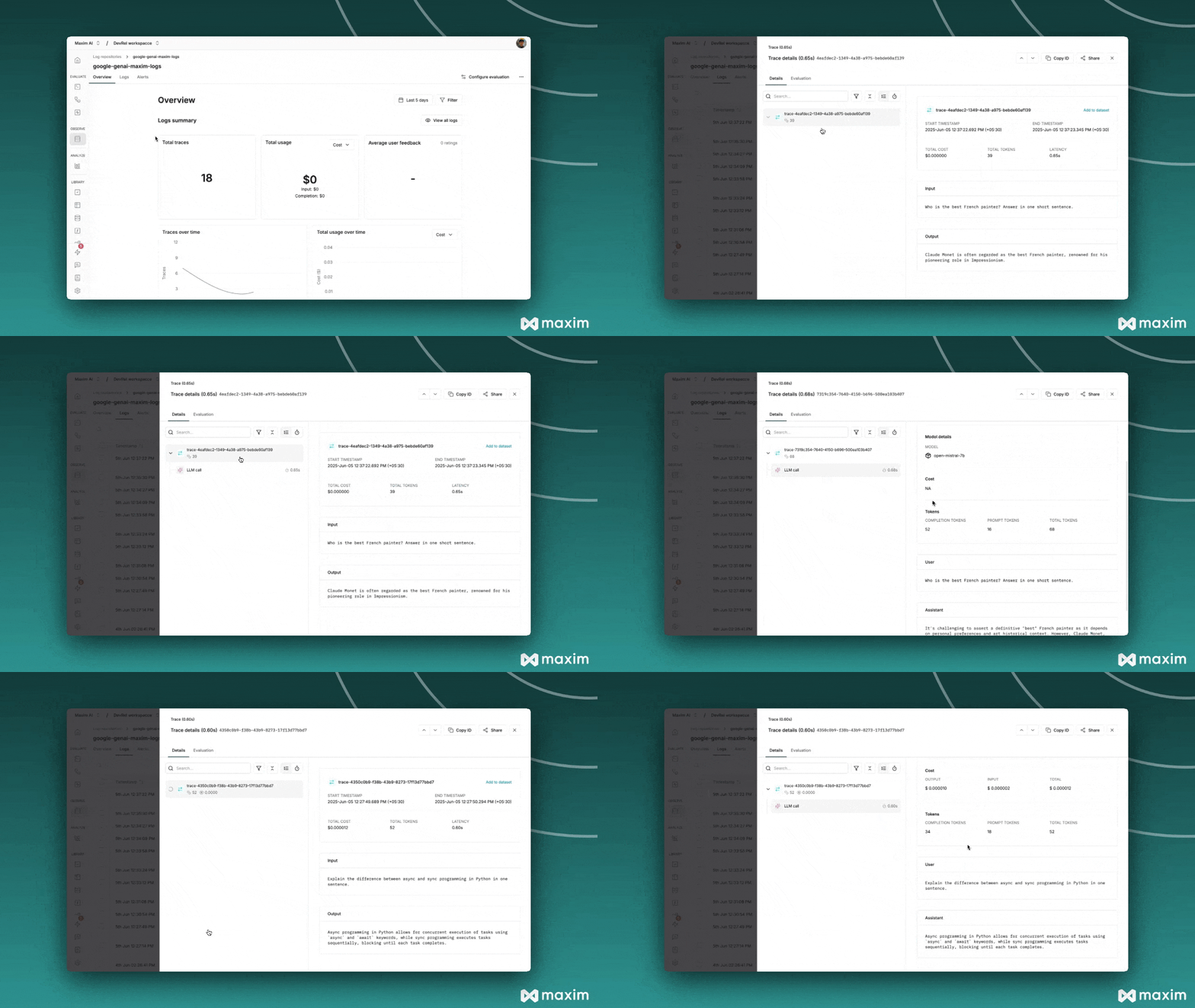
To check the logs shared by Mistral SDK with Maxim -
- Go to Logs section in Maxim Platform
- Go to the respective Log Repository you created.
- Switch to
Logsfrom top tab view and analyse the traces received
Async LLM call
[ ]
id='ef228964167649278f1eeecfe6d985d4' object='chat.completion' model='mistral-small-latest' usage=UsageInfo(prompt_tokens=18, completion_tokens=34, total_tokens=52) created=1749106669 choices=[ChatCompletionChoice(index=0, message=AssistantMessage(content='Async programming in Python allows for concurrent execution of tasks using `async` and `await` keywords, while sync programming executes tasks sequentially, blocking until each task completes.', tool_calls=None, prefix=False, role='assistant'), finish_reason='stop')]