
Api Litellm
nebius-token-factory-cookbookapi
Export
Run models on Nebius Token Factory (via LiteLLM API)


References and Acknowledgements
Pre requisites
- Nebius API key. Sign up for free at Token Factory
- And complete the setup
1 - Install Dependencies
[1]
2 - Load Configuration
[2]
NOT running in Colab
✅ NEBIUS_API_KEY found
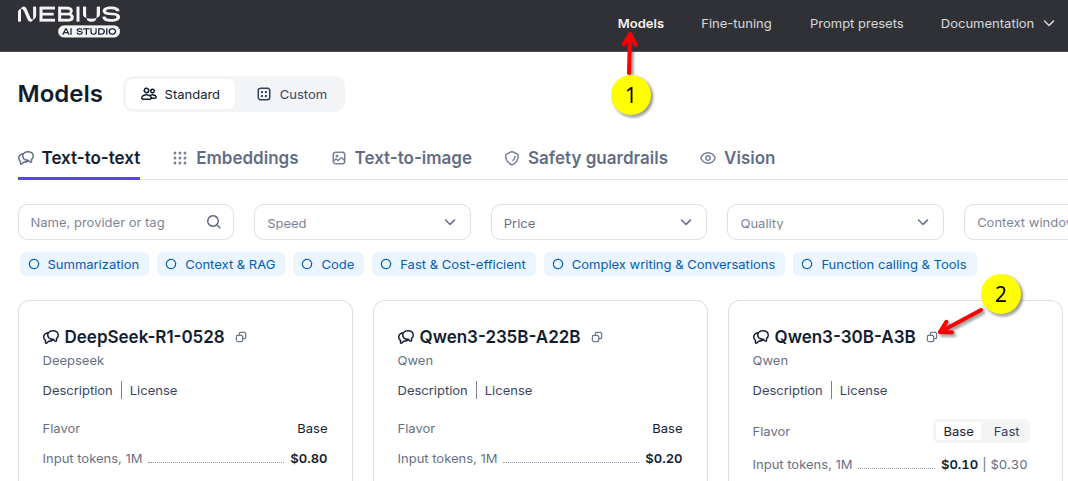
3 - Pick a Model
- Go to models tab in tokenfactory.nebius.com
- Copy the model name. For example
openai/gpt-oss-20b-Instruct-2507
4 - Run the Model
[3]
----model answer -----
The capital of the Netherlands is Amsterdam.

----- full response ----
{
  "id": "chatcmpl-63c63b527d454383946b3481709c2b81",
  "created": 1762232294,
  "model": "nebius/openai/gpt-oss-20b-Instruct-2507",
  "object": "chat.completion",
  "system_fingerprint": null,
  "choices": [
    {
      "finish_reason": "stop",
      "index": 0,
      "message": {
        "content": "The capital of the Netherlands is Amsterdam.",
        "role": "assistant",
        "tool_calls": null,
        "function_call": null
      },
      "provider_specific_fields": {
        "stop_reason": null,
        "token_ids": null
      }
    }
  ],
  "usage": {
    "completion_tokens": 9,
    "prompt_tokens": 15,
    "total_tokens": 24,
    "completion_tokens_details": null,
    "prompt_tokens_details": null
  },
  "service_tier": null,
  "prompt_logprobs": null,
  "prompt_token_ids": null,
  "kv_transfer_params": null
}
---------
CPU times: user 820 ms, sys: 194 ms, total: 1.01 s
Wall time: 4.25 s
5 - Try Your Queries
Go ahead and experiment with your queries. Here are some to get you started.
Write python code to read a csv file
write a haiku about cats