
Api Llamaindex
nebius-token-factory-cookbookapi
Export
Run models on Nebius Token Factory (via LlamaIndex API)


References and Acknowledgements
Pre requisites
- Nebius API key. Sign up for free at Token Factory
- And complete the setup
1 - Install Dependencies
[ ]
2 - Load Configuration
[2]
NOT running in Colab
✅ NEBIUS_API_KEY found
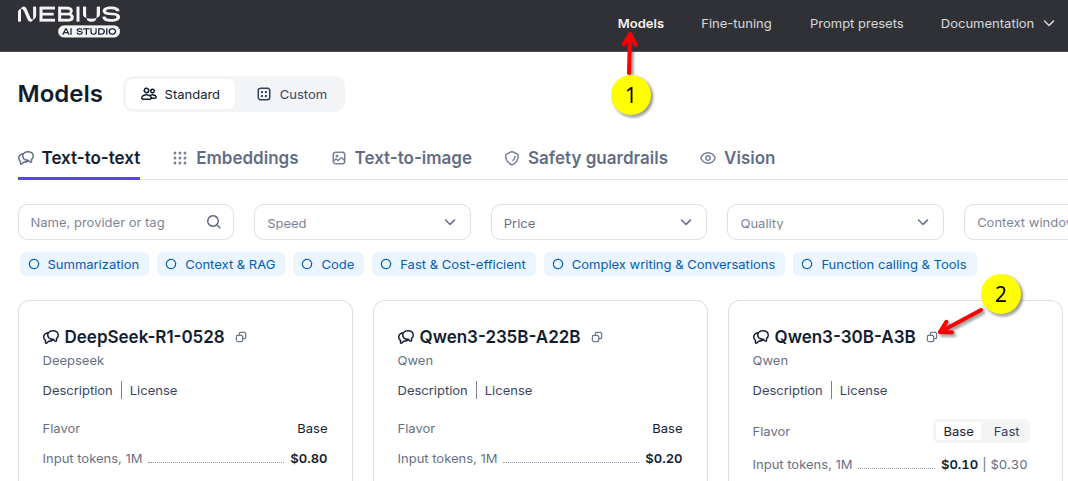
3 - Pick a Model
- Go to models tab in tokenfactory.nebius.com
- Copy the model name. For example
openai/gpt-oss-20b-Instruct-2507
4 - Run the Model
[3]
/Users/sujee/my-stuff/nebius/ai-studio-cookbook/upstream-2-tf-launch/.venv/lib/python3.12/site-packages/tqdm/auto.py:21: TqdmWarning: IProgress not found. Please update jupyter and ipywidgets. See https://ipywidgets.readthedocs.io/en/stable/user_install.html
  from .autonotebook import tqdm as notebook_tqdm
None of PyTorch, TensorFlow >= 2.0, or Flax have been found. Models won't be available and only tokenizers, configuration and file/data utilities can be used.
----model answer -----
The capital of the Netherlands is Amsterdam.
---------
CPU times: user 2.42 s, sys: 677 ms, total: 3.1 s
Wall time: 11.7 s
5 - Try Your Queries
Go ahead and experiment with your queries. Here are some to get you started.
Write python code to read a csv file
write a haiku about cats