

Gemma3N (4B) Conversational
News
Placeholder
Installation
Unsloth
FastModel supports loading nearly any model now! This includes Vision and Text models!
🦥 Unsloth: Will patch your computer to enable 2x faster free finetuning.
🦥 Unsloth Zoo will now patch everything to make training faster!
==((====))==  Unsloth 2025.6.12: Fast Gemma3N patching. Transformers: 4.54.0.dev0.
   \\   /|    Tesla T4. Num GPUs = 1. Max memory: 14.741 GB. Platform: Linux.
O^O/ \_/ \    Torch: 2.6.0+cu124. CUDA: 7.5. CUDA Toolkit: 12.4. Triton: 3.2.0
\        /    Bfloat16 = FALSE. FA [Xformers = 0.0.29.post3. FA2 = False]
 "-____-"     Free license: http://github.com/unslothai/unsloth
Unsloth: Fast downloading is enabled - ignore downloading bars which are red colored!
Unsloth: Gemma3N does not support SDPA - switching to eager!
model.safetensors.index.json: 0.00B [00:00, ?B/s]
model-00001-of-00003.safetensors: 0%| | 0.00/3.72G [00:00<?, ?B/s]
model-00002-of-00003.safetensors: 0%| | 0.00/4.99G [00:00<?, ?B/s]
model-00003-of-00003.safetensors: 0%| | 0.00/1.15G [00:00<?, ?B/s]
Loading checkpoint shards: 0%| | 0/3 [00:00<?, ?it/s]
generation_config.json: 0%| | 0.00/210 [00:00<?, ?B/s]
processor_config.json: 0%| | 0.00/98.0 [00:00<?, ?B/s]
chat_template.jinja: 0.00B [00:00, ?B/s]
preprocessor_config.json: 0.00B [00:00, ?B/s]
tokenizer_config.json: 0.00B [00:00, ?B/s]
tokenizer.model: 0%| | 0.00/4.70M [00:00<?, ?B/s]
tokenizer.json: 0%| | 0.00/33.4M [00:00<?, ?B/s]
special_tokens_map.json: 0%| | 0.00/777 [00:00<?, ?B/s]
Gemma 3N can process Text, Vision and Audio!
Let's first experience how Gemma 3N can handle multimodal inputs. We use Gemma 3N's recommended settings of temperature = 1.0, top_p = 0.95, top_k = 64
Gemma 3N can see images!
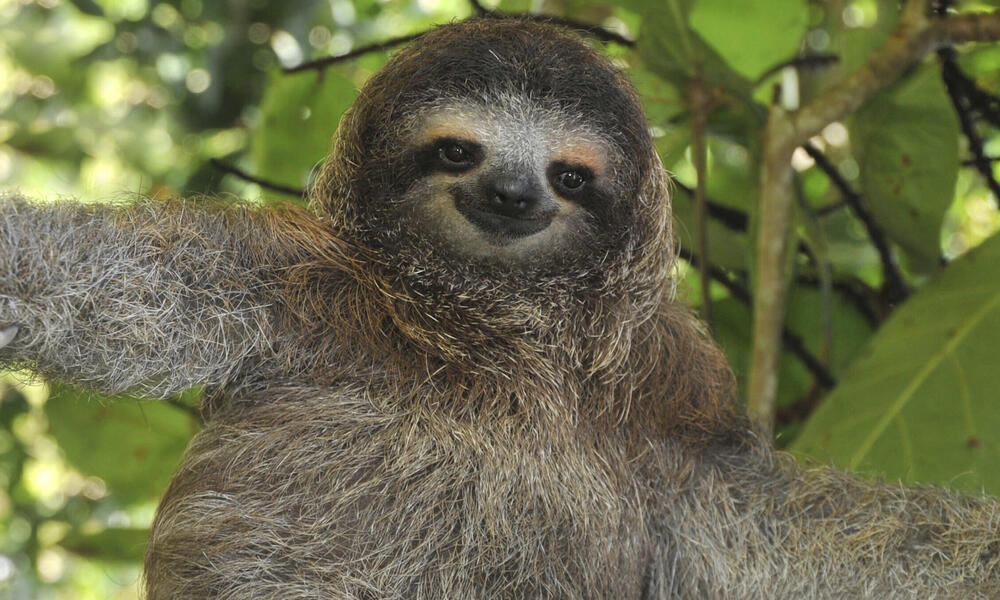
The animal in the image is a **sloth**.

Sloths have appeared in several films, often as comedic characters due to their slow movements. Here are a few examples:

* **Zootopia (2016):** Flash, a sloth, is a memorable character in this Disney film.
* **The Jungle Book 2 (2003):** Sloths are featured in this Disney sequel.
* **Curious George (2003):** Sloths appear in this animated film.
* **Many nature documentaries:** Sloths are frequently featured in nature documentaries due to their unique lifestyle.

Do you have any other questions about sloths?
<end_of_turn>
Let's make a poem about sloths!
In emerald canopies, slow they reside,
The sloth, a creature of gentle tide.
A master of stillness, a verdant hue,
Living life at a pace both calm and true.

He hangs upside down, a peaceful sight,
Ignoring the rush of day and night.
A furry embrace, a gentle sway,
He finds contentment in his own way.

Leaves are his banquet, a leafy green feast,
Energy conserved, a quiet beast.
He moves with purpose, though slow he seems,
A patient observer of nature's dreams.

No need for hurry, no need for chase
Gemma 3N can also hear!
The audio is a quote from President John F. Kennedy's famous speech to Congress on May 25, 1961. In this speech, Kennedy boldly declares the nation's commitment to achieving the goal of landing a man on the moon and returning him safely to Earth before the end of the decade. This speech is considered a pivotal moment in American history and a defining moment of the Space Race.<end_of_turn>
Let's combine all 3 modalities together!
The audio is a famous excerpt from President John F. Kennedy's inaugural address in 1961. In this speech, he passionately calls on the nation to commit to a goal of landing a man on the moon and returning him safely to Earth before the end of the decade.

The image shows a sloth hanging upside down from a tree branch in a lush, green environment.

**How they are related:**

The connection between the audio and the image is **metaphorical and likely intended to convey the slowness and deliberate nature of the space race.**

The phrase "landing a man on the moon" represents a monumental and ambitious goal, while the sloth, known for its incredibly slow movement, serves as a humorous contrast.

The image likely aims to playfully suggest that even with the urgency of the space race, there's a certain inherent slowness or patience required to achieve such a grand ambition. It's a lighthearted way to juxtapose the extraordinary goal with something very ordinary and slow-moving.

It's not a direct literal connection, but rather a clever visual metaphor playing on the contrast between human ambition and natural processes.<end_of_turn>
Let's finetune Gemma 3N!
You can finetune the vision and text parts for now through selection - the audio part can also be finetuned - we're working to make it selectable as well!
We now add LoRA adapters so we only need to update a small amount of parameters!
Unsloth: Making `model.base_model.model.model.language_model` require gradients
Data Prep
We now use the Gemma-3 format for conversation style finetunes. We use Maxime Labonne's FineTome-100k dataset in ShareGPT style. Gemma-3 renders multi turn conversations like below:
<bos><start_of_turn>user
Hello!<end_of_turn>
<start_of_turn>model
Hey there!<end_of_turn>
We use our get_chat_template function to get the correct chat template. We support zephyr, chatml, mistral, llama, alpaca, vicuna, vicuna_old, phi3, llama3, phi4, qwen2.5, gemma3 and more.
We get the first 3000 rows of the dataset
README.md: 0%| | 0.00/982 [00:00<?, ?B/s]
data/train-00000-of-00001.parquet: 0%| | 0.00/117M [00:00<?, ?B/s]
Generating train split: 0%| | 0/100000 [00:00<?, ? examples/s]
We now use standardize_data_formats to try converting datasets to the correct format for finetuning purposes!
Unsloth: Standardizing formats (num_proc=2): 0%| | 0/3000 [00:00<?, ? examples/s]
Let's see how row 100 looks like!
{'conversations': [{'content': 'What is the modulus operator in programming and how can I use it to calculate the modulus of two given numbers?',
,   'role': 'user'},
,  {'content': 'In programming, the modulus operator is represented by the \'%\' symbol. It calculates the remainder when one number is divided by another. To calculate the modulus of two given numbers, you can use the modulus operator in the following way:\n\n```python\n# Calculate the modulus\nModulus = a % b\n\nprint("Modulus of the given numbers is: ", Modulus)\n```\n\nIn this code snippet, the variables \'a\' and \'b\' represent the two given numbers for which you want to calculate the modulus. By using the modulus operator \'%\', we calculate the remainder when \'a\' is divided by \'b\'. The result is then stored in the variable \'Modulus\'. Finally, the modulus value is printed using the \'print\' statement.\n\nFor example, if \'a\' is 10 and \'b\' is 4, the modulus calculation would be 10 % 4, which equals 2. Therefore, the output of the above code would be:\n\n```\nModulus of the given numbers is: 2\n```\n\nThis means that the modulus of 10 and 4 is 2.',
,   'role': 'assistant'}],
, 'source': 'infini-instruct-top-500k',
, 'score': 4.774171352386475}
We now have to apply the chat template for Gemma-3 onto the conversations, and save it to text. We remove the <bos> token using removeprefix('<bos>') since we're finetuning. The Processor will add this token before training and the model expects only one.
Map: 0%| | 0/3000 [00:00<?, ? examples/s]
Let's see how the chat template did! Notice there is no <bos> token as the processor tokenizer will be adding one.
'<start_of_turn>user\nWhat is the modulus operator in programming and how can I use it to calculate the modulus of two given numbers?<end_of_turn>\n<start_of_turn>model\nIn programming, the modulus operator is represented by the \'%\' symbol. It calculates the remainder when one number is divided by another. To calculate the modulus of two given numbers, you can use the modulus operator in the following way:\n\n```python\n# Calculate the modulus\nModulus = a % b\n\nprint("Modulus of the given numbers is: ", Modulus)\n```\n\nIn this code snippet, the variables \'a\' and \'b\' represent the two given numbers for which you want to calculate the modulus. By using the modulus operator \'%\', we calculate the remainder when \'a\' is divided by \'b\'. The result is then stored in the variable \'Modulus\'. Finally, the modulus value is printed using the \'print\' statement.\n\nFor example, if \'a\' is 10 and \'b\' is 4, the modulus calculation would be 10 % 4, which equals 2. Therefore, the output of the above code would be:\n\n```\nModulus of the given numbers is: 2\n```\n\nThis means that the modulus of 10 and 4 is 2.<end_of_turn>\n' Unsloth: Tokenizing ["text"] (num_proc=2): 0%| | 0/3000 [00:00<?, ? examples/s]
We also use Unsloth's train_on_completions method to only train on the assistant outputs and ignore the loss on the user's inputs. This helps increase accuracy of finetunes!
Map (num_proc=2): 0%| | 0/3000 [00:00<?, ? examples/s]
Let's verify masking the instruction part is done! Let's print the 100th row again. Notice how the sample only has a single <bos> as expected!
'<bos><start_of_turn>user\nWhat is the modulus operator in programming and how can I use it to calculate the modulus of two given numbers?<end_of_turn>\n<start_of_turn>model\nIn programming, the modulus operator is represented by the \'%\' symbol. It calculates the remainder when one number is divided by another. To calculate the modulus of two given numbers, you can use the modulus operator in the following way:\n\n```python\n# Calculate the modulus\nModulus = a % b\n\nprint("Modulus of the given numbers is: ", Modulus)\n```\n\nIn this code snippet, the variables \'a\' and \'b\' represent the two given numbers for which you want to calculate the modulus. By using the modulus operator \'%\', we calculate the remainder when \'a\' is divided by \'b\'. The result is then stored in the variable \'Modulus\'. Finally, the modulus value is printed using the \'print\' statement.\n\nFor example, if \'a\' is 10 and \'b\' is 4, the modulus calculation would be 10 % 4, which equals 2. Therefore, the output of the above code would be:\n\n```\nModulus of the given numbers is: 2\n```\n\nThis means that the modulus of 10 and 4 is 2.<end_of_turn>\n' Now let's print the masked out example - you should see only the answer is present:
' In programming, the modulus operator is represented by the \'%\' symbol. It calculates the remainder when one number is divided by another. To calculate the modulus of two given numbers, you can use the modulus operator in the following way:\n\n```python\n# Calculate the modulus\nModulus = a % b\n\nprint("Modulus of the given numbers is: ", Modulus)\n```\n\nIn this code snippet, the variables \'a\' and \'b\' represent the two given numbers for which you want to calculate the modulus. By using the modulus operator \'%\', we calculate the remainder when \'a\' is divided by \'b\'. The result is then stored in the variable \'Modulus\'. Finally, the modulus value is printed using the \'print\' statement.\n\nFor example, if \'a\' is 10 and \'b\' is 4, the modulus calculation would be 10 % 4, which equals 2. Therefore, the output of the above code would be:\n\n```\nModulus of the given numbers is: 2\n```\n\nThis means that the modulus of 10 and 4 is 2.<end_of_turn>\n' GPU = Tesla T4. Max memory = 14.741 GB. 12.592 GB of memory reserved.
Let's train the model!
To resume a training run, set trainer.train(resume_from_checkpoint = True)
==((====))==  Unsloth - 2x faster free finetuning | Num GPUs used = 1
   \\   /|    Num examples = 3,000 | Num Epochs = 1 | Total steps = 60
O^O/ \_/ \    Batch size per device = 1 | Gradient accumulation steps = 4
\        /    Data Parallel GPUs = 1 | Total batch size (1 x 4 x 1) = 4
 "-____-"     Trainable parameters = 19,210,240 of 4,000,000,000 (0.48% trained)
`use_cache=True` is incompatible with gradient checkpointing. Setting `use_cache=False`.
Unsloth: Will smartly offload gradients to save VRAM!
542.1338 seconds used for training.
9.04 minutes used for training.
Peak reserved memory = 12.592 GB.
Peak reserved memory for training = 0.0 GB.
Peak reserved memory % of max memory = 85.422 %.
Peak reserved memory for training % of max memory = 0.0 %.
['<bos><start_of_turn>user\nContinue the sequence: 1, 1, 2, 3, 5, 8,<end_of_turn>\n<start_of_turn>model\n13, 21, 34, 55, 89, 144, 233, 377, 610, 987, 1597, 2584, 4181, 6']
You can also use a TextStreamer for continuous inference - so you can see the generation token by token, instead of waiting the whole time!
The sky is blue because of a phenomenon called Rayleigh scattering. Sunlight is made up of all the colors of the rainbow, but blue light has a shorter wavelength than red light. When sunlight enters the Earth's atmosphere, it collides with tiny air molecules (mostly nitrogen and oxygen). This collision causes the blue light to
['gemma-3n/processor_config.json']
Now if you want to load the LoRA adapters we just saved for inference, set False to True:
Gemma-3N is a **new open-weight large language model (LLM)** developed by **Google DeepMind**. It's designed to be **accessible to a wider range of users**, including researchers and developers, by being **open-weight**. This means the model's weights are publicly available, allowing for more experimentation and customization.

Here's a breakdown of what Gemma-3N is:

* **Large Language Model (LLM):** Gemma-3N is a powerful AI model trained on a massive dataset of text and code. This allows it to understand and generate human-like text, translate
Saving to float16 for VLLM
We also support saving to float16 directly for deployment! We save it in the folder gemma-3N-finetune. Set if False to if True to let it run!
If you want to upload / push to your Hugging Face account, set if False to if True and add your Hugging Face token and upload location!
GGUF / llama.cpp Conversion
To save to GGUF / llama.cpp, we support it natively now for all models! For now, you can convert easily to Q8_0, F16 or BF16 precision. Q4_K_M for 4bit will come later!
Likewise, if you want to instead push to GGUF to your Hugging Face account, set if False to if True and add your Hugging Face token and upload location!
Now, use the gemma-3N-finetune.gguf file or gemma-3N-finetune-Q4_K_M.gguf file in llama.cpp.
And we're done! If you have any questions on Unsloth, we have a Discord channel! If you find any bugs or want to keep updated with the latest LLM stuff, or need help, join projects etc, feel free to join our Discord!
Some other resources:
- Train your own reasoning model - Llama GRPO notebook Free Colab
- Saving finetunes to Ollama. Free notebook
- Llama 3.2 Vision finetuning - Radiography use case. Free Colab
- See notebooks for DPO, ORPO, Continued pretraining, conversational finetuning and more on our documentation!


