

Artifact Fundamentals

Use Weights & Biases for machine learning experiment tracking, dataset and model versioning and management, collaboration and more.
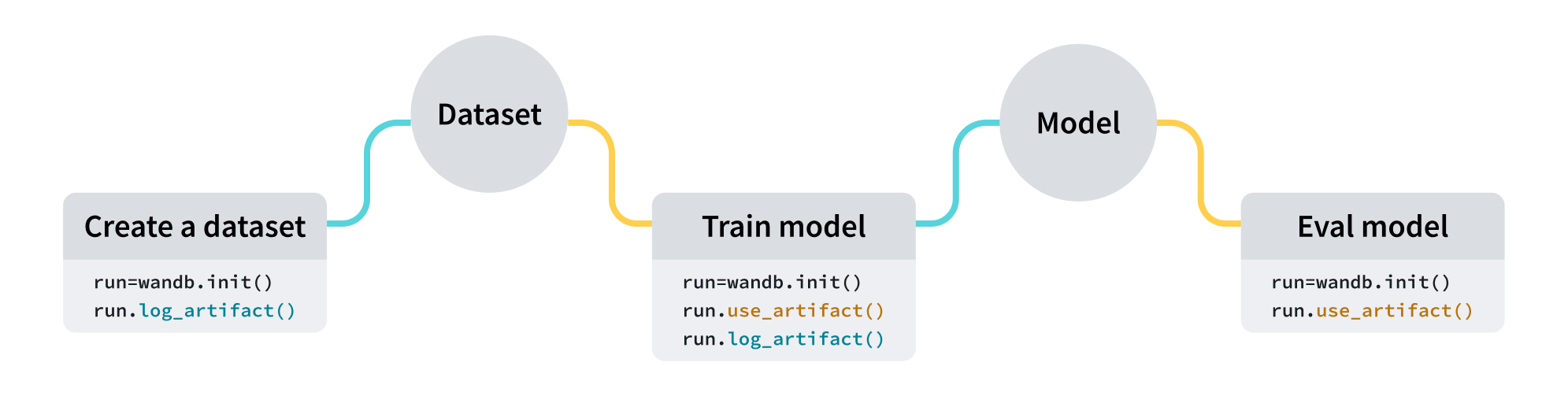
Use W&B Artifacts to track and version data as the inputs and outputs of your W&B Runs. In addition to logging hyperparameters, metadata, and metrics to a run, you can use an artifact to log the dataset used to train the model as input and the resulting model checkpoints as outputs.
Set Up
In order to use Weights & Biases, you will need the wandb package installed. You can install it as follows within Colab.
Once it is installed, the next step is to import it into your script or notebook with import wandb.
We also need to authenticate to the Weights & Biases server. There are various ways of doing this, including for remote or non-interactice workflows, but given this is running interactively, we can use wandb.login().
If we are not already authenticated, a link will appear which you can use to do so.
Create a Dataset
Let's create some datasets that we can work with in this example.
Create An Artifact
The general workflow for creating an Artifact is:
- Intialize a run.
- Create an Artifact.
- Add a any files or directories to the new Artifact that you want to track and version.
- Log the artifact in the W&B platform.
The most straightforward way of accomplishing this is the second line of code in the example below, which will log, track and version a new dataset (i.e. do points 2, 3, and 4 above in one step).
In the above example we first initalize a run using wandb.init() the artifact-basics project. If this project doesn't exist, it will be created. If it alreadt exists, a new W&B Run will be added to it.
In the second line we actually log the Artifact with run.log_artifact(). In this example, we use three common arguments to the function.
- With
artifact_or_pathwe specifiy the path to where the data we want to version exists. Any file or directory can be added here. - with
namewe give the artifact a name within Weights & Biases that we will use to access it. - With
typewe give the artifact a higher level grouping. For example, we may have multiple artifacts of type data, and multiple artifacts of type model.
See the Artifacts Reference guide for more information and other commonly used arguments, including how to store additional metadata.
Each time the above log_artifact is executed, wandb will create a new version of the Artifact within Weights & Biases if the underlying data has changed.
An alternative approach that offers more control (at the expense of more lines of code) can be seen below.
In the above example, lines 3-5 will create a new Artifact within your Weights & Biases project. With the resulting artifact object, you can call the artifact.add_file or artifact.add_dir functions in order to add as many files and directories to the Artifact as you want. Once added, the artifact must then be explictly logged to Weights & Biases.
Use an Artifact
When you want to use a specific version of an Artifact in a downstream task, you can specify the specific version you would like to use via either v0, v1, v2 and so on, or via specific aliases you may have added. The latest alias always refers to the most recent version of the Artifact logged.
The proceeding code snippet specifies that the W&B Run will use an artifact called my_first_artifact with the alias latest:
For more information on ways to customize your Artifact download, including via the command line, see the Download and Usage guide.
Create a new Artifact version
Let's say we want to modify our dataset while also tracking and versioning these changes. In the below example we will subsample our dataset and save it as a new file. We will use the Pandas library to read our CSV file.
In the second block of code we will log it to Weights & Biases under the same Artifact name (my_first_artifact) so that Weights & Biases knows that this is a new version of an existing artifact.
Now we have a new subsampled version of our dataset locally, we can log the new version to Weights & Biases.
Now the sampled dataset will be logged to the my_first_artifact Artifact as a new version.
The Artifact has also been given a custom alias, which is a unique label for this Artifact version. While the alias is currently subsampled, the default aliases is vN, where N is the number of versions the Artifact has. This increments automatically. You can always access specific versions of an Artifact by using an alias.
Update Artifact version metadata
You can update the description, metadata, and alias of an artifact on the W&B platform during or outside a W&B Run.
This example changes the description of the my_first_artifact artifact inside a run:
Use the Artifact within your pipelines
Once the artifact is tracked and versioned within Weights & Biases it's now easy to integrate it into your ML workflows.
Navigate the Artifacts UI
You can also manage your Artifacts via the W&B platform. This can give you insight into your model's performance or dataset versioning. To navigate to the relevant information, click this link, then click on the Artifacts tab.
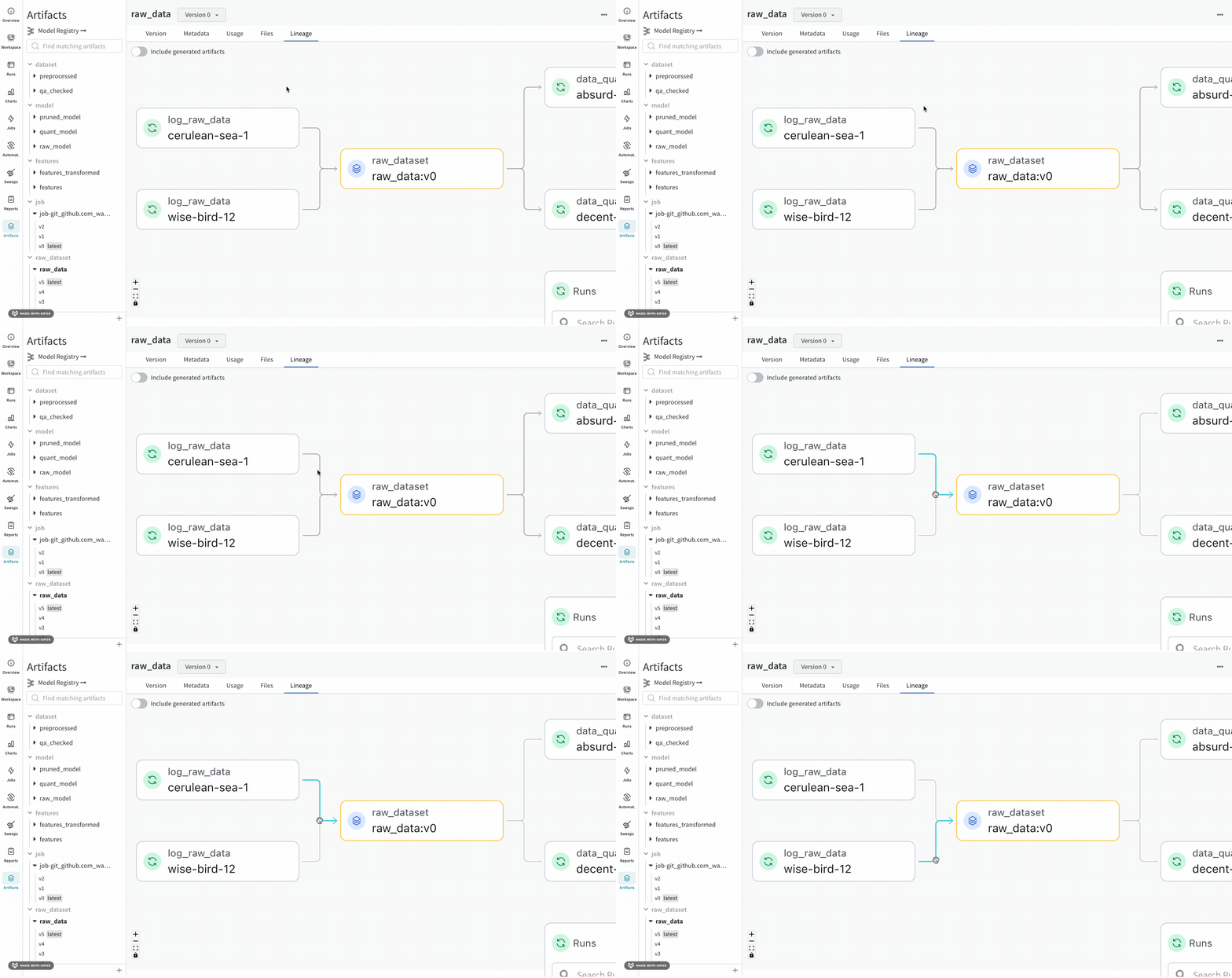
Navigating to the Lineage section in the tab will show the dependency graph formed by calling run.use_artifact() when an Artifact is an input to a run, and run.log_artifact() when an Artifact is output to a run. This helps visualize the relationship between different model versions and other objects like datasets and jobs in your project. Click this link to navigate to the project's lineage page.
Naturally, as you integrate W&B Artifacts into your workflow, lineage graphs such as this interactive example will be built up over time, giving you reproducibility, governance, and auditability.
Next steps
- Artifacts Python reference documentation: Deep dive into artifact parameters and advanced methods.
- Lineage: View lineage graphs, which are automatically built when using W&B artifact system, providing an auditable visual overview of the relationships between specific artifact versions, datasets models and runs.
- Model Registry: Learn how to centralize your best artifact versions in a shared registry.
- Artifact Automations: Automatically run specific Weights & Biases jobs based on changes to your artifacts, such as automatically training a new model each time a new version of the training data is logged.
- Reference Artifacts: Track files saved outside the W&B server, like Amazon S3 buckets, GCS buckets, Azure blobs, and more.